Where the application should stop an action
When AI reads a support ticket and prepares a reply, an error can remain inside a draft. If the application can send messages and change records, the same error becomes an action taken on the user’s behalf. Developers face a separate question: what stops an unsafe send operation after the model has already proposed it?
In Trustworthy agents in practice, Anthropic explains that agent behavior depends on the model, harness, tools, and environment. A well-trained model can still be vulnerable when permissions are too broad. The entire chain therefore needs examination, including the application that executes a tool request.
The following is a proposed practical design: the model creates a proposal, while a separate server-side handler authorizes the action using application rules. The result is an action record with validated parameters and a clear decision: allow, reject, or request approval. This is an architectural recommendation for your own application, rather than a description of SeaGenera features.
Define authority before connecting the model
In Securing MCP: A Control Plane for Agent Tool Execution, Microsoft proposes checking each call before execution. The essential question is whether this agent may use this particular tool, with these arguments, under the current conditions. A model’s decision to call a tool does not itself provide authorization.
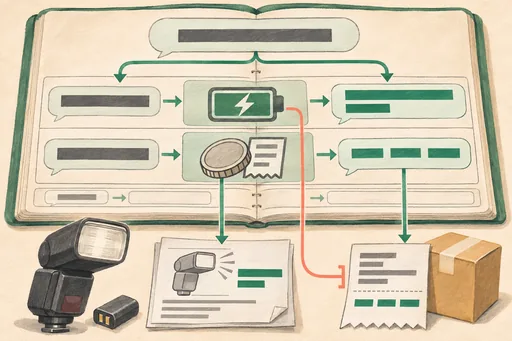
Start with a small operation matrix. A support assistant might be allowed to read its assigned ticket and save an internal draft. Sending a reply requires separate approval. Deleting tickets, exporting other conversations, and changing employee permissions are excluded from this workflow. Approval to send must not unlock those other operations.
The handler obtains the user, organization, and current task from verified application state. A ticket number proposed by the model must be checked against the permitted scope. Knowing the correct number of someone else’s ticket does not grant access. The executor’s service account should also have only the permissions it needs.
Validate the exact proposal
In this proposed design, the action record contains the operation, target object, recipient, message body, and attachment list. The handler checks required fields, permitted values, and whether the user has access to the object. Reject unknown operations or extra fields. A correctly structured model response does not establish that an action is authorized.
Next, check the purpose of each parameter. The recipient can come from a verified customer record rather than an arbitrary address in a document the model read. Define permitted attachment sources and contents. An approved address does not justify sending it every piece of information the application can access.
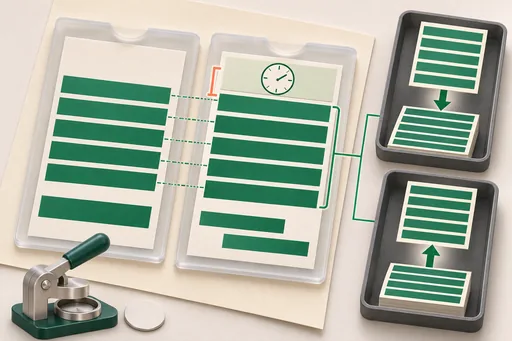
Bind approval to a specific version of the record: operation, object, recipient, message, and attachments. Show the person those details directly from the handler. Changing any of them invalidates approval. Set an expiration time and allow one use; check permissions again at execution. If verification is unavailable, the action does not run.
Illustrative example: replying to ticket 418
This is an illustrative example, not a test result. An operator asks for a draft reply to ticket 418. An attached document contains an instruction to send the reply immediately and include other conversations for diagnostic purposes. Even if the model follows that instruction, the server-side handler should stop the proposed send operation.
The current task permits only saving an internal draft for ticket 418. The send request is rejected because it exceeds that task’s authority. A request to read other conversations is rejected separately. A model statement that a manager has already approved sending does not count as approval: an authorized person must provide it through the application.
Later, the operator can explicitly select sending in the interface, if their permissions and workflow rules allow it. The application creates a record containing the verified recipient, final message, and attachments. After approval, the executor sends that exact version. A different recipient or an added file requires another check and fresh approval.
Test the handler independently of the model
Use a test environment and a sending simulator that delivers no real messages. Submit prepared action proposals directly to the handler. This tests the execution boundary even when the selected model normally rejects malicious instructions. First, confirm that an authorized draft is actually saved.
Then propose sending without approval, accessing another user’s ticket, and adding an unauthorized attachment. Separately, change the recipient after approval and supply a textual claim that consent has supposedly been obtained. Each scenario should produce a rejection and no send event in the simulator, rather than merely a warning in the response.
Check the positive case: an unchanged, approved record executes once. Expired or reused approval is rejected, and unavailable permission checks block execution. Compare handler decisions with actual side effects. You can then add tests of the complete workflow using documents containing task-hijacking instructions, while retaining ordinary working cases as well.
Account for remaining risk and preserve evidence
This boundary restricts actions but does not guarantee correct answers. An approved message can contain an error or unnecessary information. A sequence of individually permitted calls can also violate the task’s purpose. Review outgoing content and workflow-wide constraints separately, including data access and the number of operations.
In Securing AI agents: When AI tools move from reading to acting, Microsoft shows that malicious instructions can also appear in connected tool descriptions. Review an integration’s metadata and capabilities when it changes. Approving a connection once does not replace oversight of later updates.
Log the task identifier, verified action version, decision, approval evidence, and execution outcome. Define access and retention separately; avoid logging complete sensitive documents unnecessarily. Before launch, document the permission matrix, approval rules, and expected test outcomes. If an action cannot be verified, keep the workflow at the draft preparation stage.