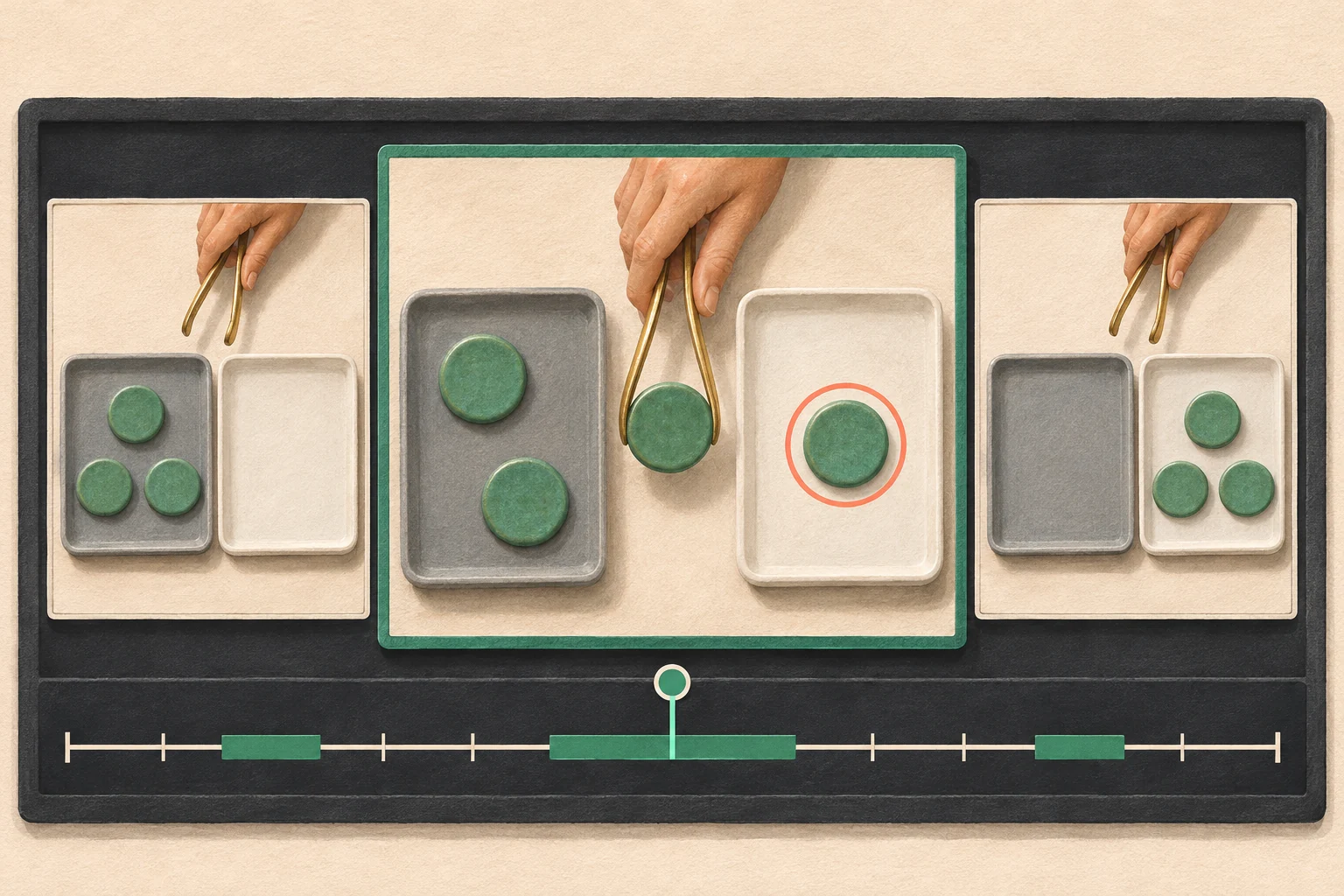
The task: objects should move while their total stays constant
Alibaba: Wan 3.0 is a candidate for drafting a training scene, sorting demonstration, or packaging storyboard. The practical question here is specific: can viewers see that an object moved between locations while the total remained unchanged? An attractive final frame alone cannot establish that.
The official Qwen Music2MV guide lists Wan 3.0 for video generation. Its separate adapter reference names the exact identifier wan3.0-video and includes semantic checks for cast count and action adherence. The object-count check below is our own method for this scenario.
We will use a fictional example: a hand moves three ceramic tokens between two trays with tongs. Every prompt is illustrative; no paid generations were performed. The reader’s practical deliverable is a reviewed video draft and an observation record explaining why it can be accepted or needs revision.
Prepare an object accounting plan
For this example, choose three identical green tokens, a shallow grey tray on the left, and an empty white tray on the right. The camera should show both tray bottoms and the tongs’ route. Separate the tokens: a stack complicates counting and could hide an extra object underneath another.
Before generation, record four states following completed transfers: three left and zero right; then two and one; one and two; zero and three. During movement, add a third accounting location: the tongs. Every verifiable state should satisfy this condition: left + held in tongs + right = 3.
Do not treat an invisible object as absent. If the hand covers a tray, its count is temporarily unknown. That obstruction prevents verification in this training scene, so plan for narrow tongs, a high camera angle, and space between the trays. These are demonstration readability requirements, not measurements of model accuracy.
Settings available in SeaGenera
The November 18, 2026 snapshot lists Playground and API availability with text and image input. Audio and video references are unavailable here. This model card also provides no parameter for extending a completed clip.
The card offers 480p, 720p, 1080p, whole-second durations of 2–30 seconds, and 16:9, 4:3, 1:1, 3:4, 9:16 ratios. It lists generate_audio, seed, first and last frames, and image input_references. Valid combinations are checked separately.
For our example, plan 12 seconds, 720p, 16:9, and disabled audio: the visible transfer is what matters. An image of the initial arrangement can serve as the first frame. A last frame showing the filled right tray specifies the desired ending but cannot establish that the intervening movement was correct.
Do not copy the entire general supported_parameters list into a video request. We do not use its temperature or max_tokens fields in this scenario. The presence of seed does not replace reviewing another result either: a matching value is not evidence that frame content matches.
Two example prompts with different purposes
First example prompt, for the complete sequence: A twelve-second demonstration in one continuous shot. Fixed camera looking down at a slight angle. Three separate green ceramic tokens lie in a shallow grey tray on the left; a white tray on the right is empty. One hand uses narrow tongs to transfer the tokens individually from left to right. After each transfer, the tongs open and withdraw, leaving the token visible. Both trays remain in frame throughout. End with the left tray empty and three tokens on the right. No cuts.
Second example prompt, for a simpler first-frame check: Use the attached arrangement as the start of a six-second continuous shot. The tongs transfer only one of the three tokens from the left tray to the right and withdraw. The other two tokens remain still, separated by a gap. End with a pause: two tokens left, one right. Keep the camera fixed and the hand clear of the tray contents.
The second version checks a shorter action; it does not extend the first clip. A readable single transfer does not establish that a three-transfer sequence will work. Record settings and images separately for each version; differences between results cannot automatically be attributed solely to changed wording.
How to review the completed clip
First watch the downloaded file at normal speed: each transfer should be understandable. Then pause before pickup, during movement, after release, and after the tongs withdraw. At every pause, record the time and the count in all three locations. Mark unreadable sections as unknown.
Fictional defect example: at 5.2 seconds, two tokens are visible on the left, one is held by the tongs, and one is on the right. That makes four instead of three. Even if the final frame returns to three, this passage fails. This is an example error record, not an observation from an actual Wan 3.0 generation.
Define acceptance beforehand: every pickup and release can be followed; counts match the plan after each transfer; no required section remains unknown. Inspect neighbouring frames around suspicious moments. Selected pauses can reveal a defect but miss a brief duplicate between them, so review the entire sequence as well.
Limitations, waiting, and cost
This check evaluates observable counts and transfer clarity. It does not establish realistic gripping force, token mass, or suitability as instructions for real equipment. The official Music2MV guide also separates technical file checks from action correctness. A newly generated higher-resolution result requires another review.
API video generation is asynchronous. Wait for completed; do not automatically create another operation when the status is uncertain. Keep the original operation key when redelivering the same request. Once ready, download the file and retain the selected settings and initial arrangement description alongside your notes.
Billing is per second and depends on resolution. At one rate, two successful twelve-second attempts mean 24 × the per-second rate; this is an arithmetic example, not a current quote. Check the card and /pricing before submission. The preliminary reserve differs from confirmed billing; consult history for the final charge.


