A suitable task for this review
Consider Alibaba: Wan 2.7 for a short product preview featuring a mirror. An official Alibaba Cloud example uses wan2.7-i2v to animate an image and lists audio output. Alibaba’s LumenX project separately lists Wan 2.7 Image/Video. The OpenRouter card for alibaba/wan-2.7 describes text, image, and first/last-frame generation. These descriptions concern their respective integrations; SeaGenera’s controls require a separate check.
The practical deliverable is a clip in which an object’s movement agrees with its reflection. This scenario could serve an advertising insert or a visual concept for a product shoot. The fictional example below uses a matte green bell with a coral handle. All prompts are illustrative: no paid generations were performed for this article, and no measured quality results are reported.
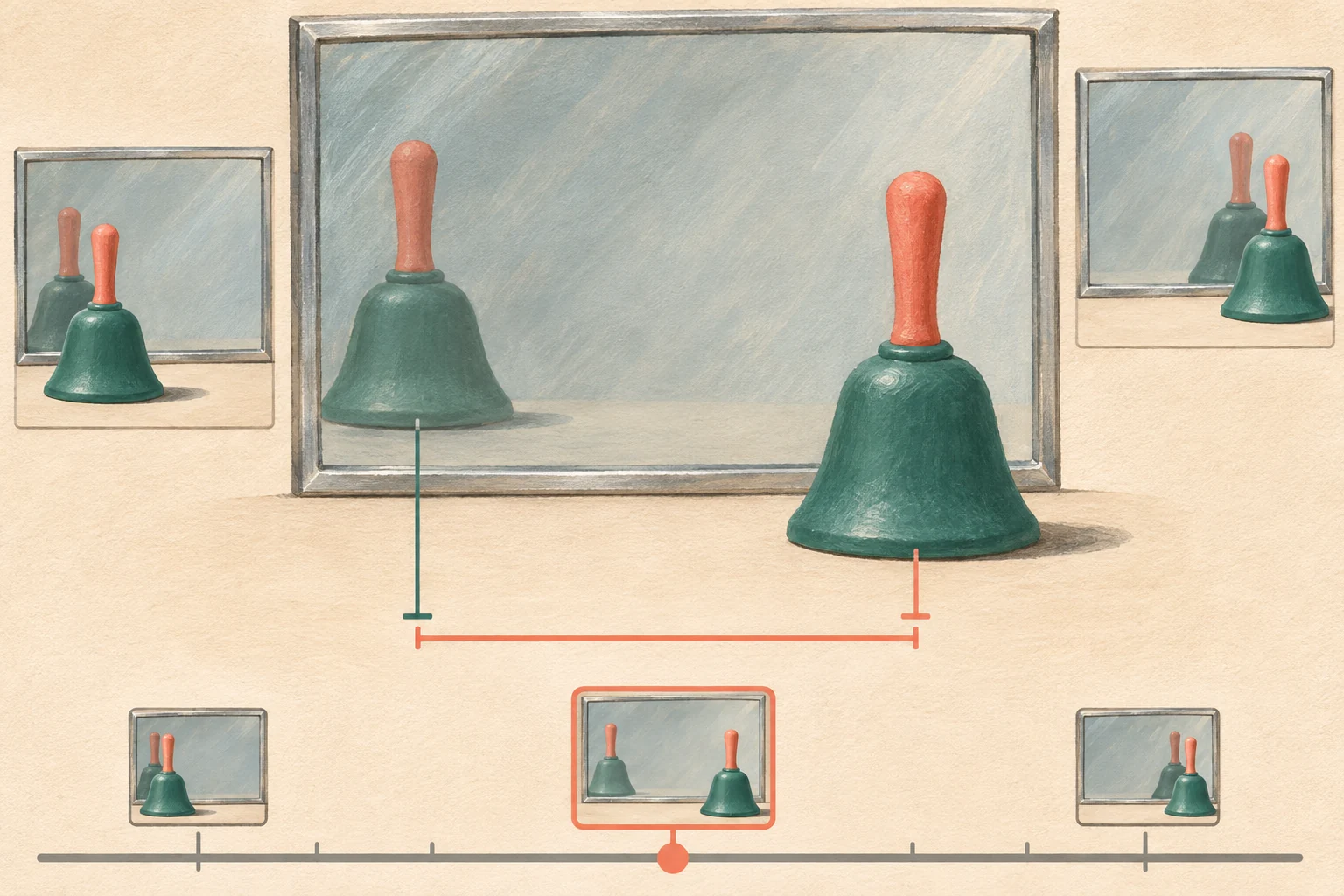
Prepare three reference positions
Place the bell in front of a stationary flat mirror. Fix the camera and lighting, and frame the scene without the camera’s reflection. Mark starting, middle, and final positions for the base on the table. For example, the outer marks could be eight centimetres apart. This is an illustrative setup dimension, not a model requirement. Keep the object and its reflection distinguishable.
Take three photographs, moving the bell between the marks. Use the starting and final photographs as guide frames. Retain the middle photograph for independent checking: it shows the expected reflection at a particular object position. Preserve the image boundaries, mirror position, and camera angle. Even a small camera adjustment makes the later comparison harder.
Before generation, inspect the photographs themselves. Is the entire handle visible? Does the mirror frame obscure an important detail? Can you distinguish the base and its reflection? If a reference photograph is ambiguous, fix the setup first. Otherwise, you may struggle to distinguish a model error from a mistaken reading of your own reference.
Two illustrative prompts
Example prompt using a first frame: Create a six-second product video from the attached starting image. Keep the camera and mirror stationary. The bell moves smoothly to the right along the table, preserving the shape of its base and coral handle. Its reflection corresponds to the object’s current position throughout the movement. The object stops after moving. One continuous shot, without cuts. For this example, define the acceptable final position beforehand using the table mark.
Example prompt using first and last frames: Connect the attached starting and final bell positions with continuous sideways movement. Keep the camera, mirror, table, and lighting stationary. The object and reflection start and stop moving together. Preserve the handle’s shape in both views of the object. Add no other objects. These variants impose different conditions; they do not establish an advantage for two guide frames. Matching endpoints also does not establish a correct middle.
How to inspect the finished clip
First, watch the downloaded file at normal speed. Does the reflection feel part of the same scene? Do movement and stopping agree? Then inspect suspicious sections frame by frame. Record the time, bell position, reflection position, and reason for your decision. Record camera movement separately: it may make the original photographs unsuitable for precise comparison.
Find the moment when the bell’s base reaches the middle mark. This is not necessarily halfway through the clip, because its speed may vary. Compare that frame with the middle reference photograph, aligning the mirror boundaries. Check the reflection’s position, the visible side of the handle, and the base shape. If the object never reaches the mark or the mirror moves, record that this check could not be completed.
Check whether your acceptance sheet handles a described violation. Example diagnostic error: the bell has stopped on the right while its reflection continues moving. A reviewer should reject motion consistency even if the first and final frames look convincing. This is an illustrative error description, not an observed Wan 2.7 result. Acceptance requires agreement in position, details, and movement; an attractive overall appearance is insufficient.
SeaGenera controls and boundaries
The supplied catalog snapshot dated 23 November 2026 lists 720p and 1080p, integer durations from 2 to 10 seconds, and aspect ratios of 16:9, 9:16, 1:1, 4:3, and 3:4. It includes frame size, audio control, first/last frames, and image references. For the illustrative setup, choose 6 seconds, 720p, 16:9, and audio disabled, checking that the complete combination is accepted before submission.
SeaGenera’s documentation allows both guide frames; frames take priority when combined with references. The prepared photograph pair is therefore sufficient for this example. The catalog’s reference count of 32 does not guarantee that every collection is valid. The seed field is labelled Boolean, so these data do not establish a numeric range. Do not transfer the text-chat parameters temperature, top_p, and max_tokens into a video request.
Video input, audio references, editing, and continuation of an existing clip are not documented for this SeaGenera card. Other Wan 2.7 integrations do not establish their availability here. Check audio control against the finished file as well. The mirror scenario remains a proposed evaluation: guide frames do not guarantee a physically consistent reflection.
Attempt costs and limits of the conclusion
SeaGenera’s catalog lists billing per second of video for this model. For an estimate, multiply duration by the current rate for your settings. Example calculation: three completed six-second clips at the same rate represent eighteen billable seconds. Check the actual rate in the model card and on /pricing. Review the displayed reserve before submission and the confirmed charge after completion.
Video generation creates a job whose status is checked afterward. Retain its identifier and operation key. If the result remains unconfirmed, check the history before resubmitting. A new generation is a separate paid attempt. Download the completed clip and inspect the exact file intended for publication: subsequent cropping could hide the stop or part of the mirror.
One accepted clip establishes the suitability of that particular file for the chosen composition. It does not establish Wan 2.7’s error frequency across other mirrors, materials, or movements. If the reflection remains unsuitable, a setup without a mirror may be a practical solution. Keep ordinary filming available when demonstrating a real product’s behaviour.