The task
Qwen: Qwen Image 3 Pro generates and edits images from text and reference pictures. Here the task is to turn a device photograph into a card with three callout labels. The practical goal is a diagram where readers can tell exactly which part each name identifies.
OpenRouter’s model card confirms this version’s purpose; an official QwenLM repository uses the identifier qwen-image-3.0-pro. In SeaGenera, select qwen/qwen-image-3-pro from the specified card. Distinguish the services’ identifiers when preparing a request to avoid accidentally selecting a neighboring version.
This scenario suits product explanations, training handouts, and draft manuals. Both requests below are illustrative examples, without paid generations. They demonstrate an acceptance procedure, not measured model performance. Readable words alone do not make a diagram correct.
Prepare the photograph and part map
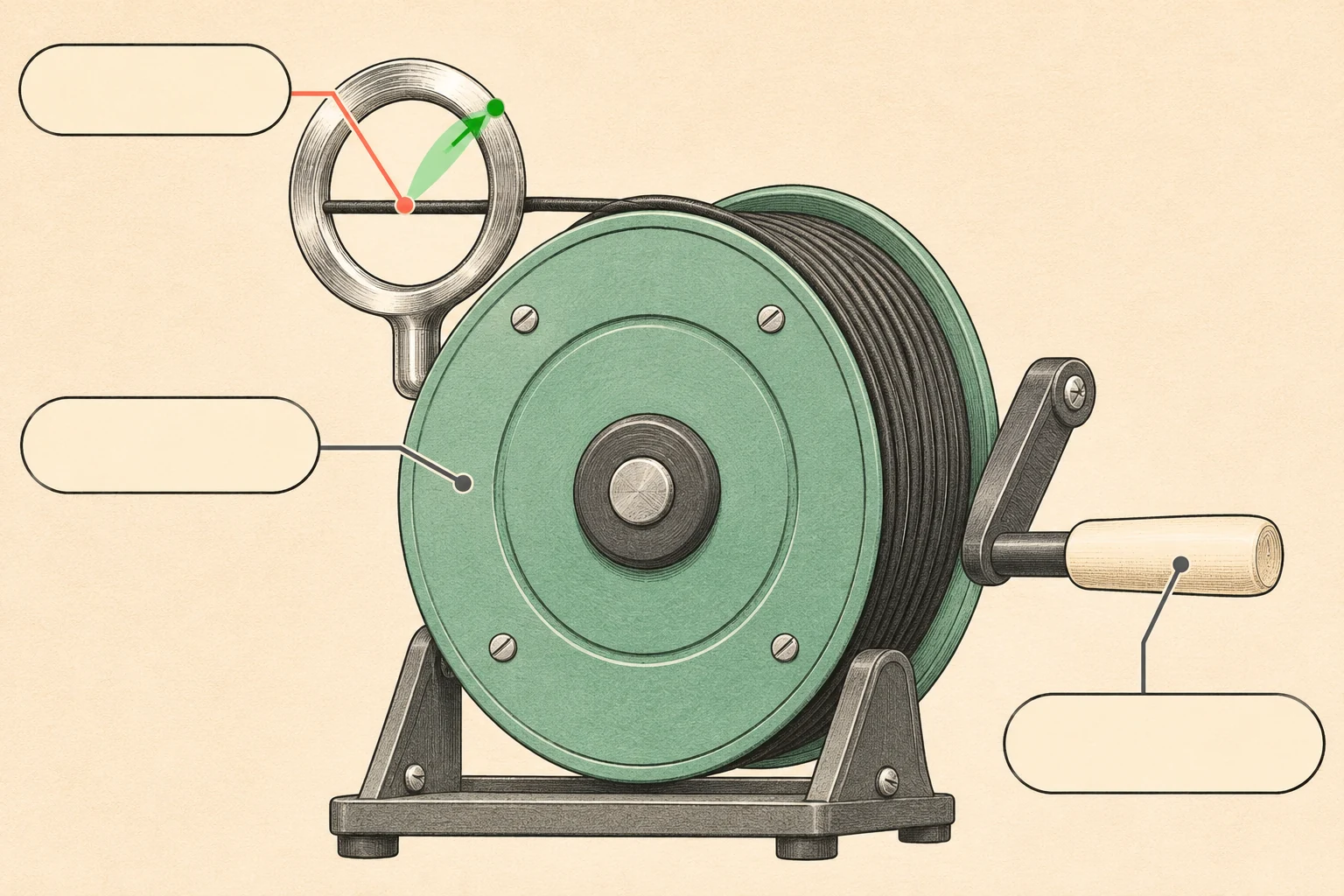
Fictional example: a desktop cord reel. The photograph shows a central drum, a crank handle on the right, and a guide ring at the upper left. Three labels are needed: “Drum,” “Crank handle,” and “Guide ring.” The photograph establishes the device’s appearance; someone familiar with its construction confirms the names beforehand.
For each label, record the acceptable leader endpoint. For the drum, use its visible sidewall; for the handle, the handgrip; for the ring, its metal rim. Also record nearby incorrect targets: the drum axle, the handle’s connecting shaft, and the cord passing through the ring. This creates three testable mappings instead of a general request for clarity.
Choose a view that exposes all three targets. If the cord obscures the ring, prepare another photograph first: generating a hidden boundary cannot confirm the real object’s construction. Leave room around the reel for labels. Keep the original photograph separately so a later edit does not silently become the new reference.
What SeaGenera supports
According to the catalog and SeaGenera documentation snapshot dated November 22, 2026, the model is available in Playground and the API. Controls include 1K or 2K resolution, one to six outputs, up to four references, and seed support. Aspect ratios are 1:1, 1:2, 1:4, 2:1, 2:3, 3:2, 3:4, 4:1, 4:3, 4:5, 5:4, 9:16, and 16:9.
For this example, choose 3:2, 1K, one output, and one photograph. Images use /v1/images; streaming is unavailable for this card. Text chat parameters listed in supported_parameters cannot automatically be transferred to an image request.
There is a discrepancy: the opened OpenRouter and ComfyUI pages describe a maximum of three references, while SeaGenera’s catalog lists four. This does not establish that a fourth input works. Our example uses one image; another combination would require separate confirmation of support.
ComfyUI’s node documentation includes prompt_extend. SeaGenera’s published schema for this card does not declare it or a separate masked editing mode. Do not rely on a local edit that protects the remaining area. Listed seed support also does not guarantee unchanged details after modifying the request.
Two example requests
Example first request, with the original photograph: “Prepare an explanatory card from this photo. Preserve the reel’s viewpoint, construction, and shape. Add exactly three labels: ‘Drum,’ with its leader ending on the sidewall; ‘Crank handle,’ ending on the handgrip at the right; ‘Guide ring,’ ending on the metal rim at the upper left. Arrange labels around the object without crossing leaders. Add no other text or parts.”
Example correction of a hypothetical defect: attach the generated picture as a new reference and ask: “The ‘Guide ring’ leader incorrectly ends on the cord. Move its endpoint to the ring’s rim. Preserve all three labels, the other connections, the viewpoint, and the reel’s construction.” This is a separate editing attempt, not a promise of an isolated replacement.
After correction, compare the result with both the previous card and the original photograph. Otherwise, a successful leader correction could conceal an altered drum. If only one callout is defective, correcting it in a conventional graphics editor and checking again may be reasonable.
How to accept the diagram
Check each complete connection: read the label, follow its leader, and identify the part at the endpoint. Inspect an enlarged view, then the intended card size. Reduction may make neighboring boundaries indistinguishable. A crossing that resembles a branching connection also needs correction.
Example hypothetical record: all three labels are spelled correctly, but only two leaders reach the intended parts. The connection score is two out of three, so the card fails acceptance. This illustrates counting, not a Qwen test result. Also check for extra labels, duplicated leaders, and invented parts.
Give the card to another person without the original mapping and ask them to point to the named parts. Compare their choices with the photograph. Test the review procedure with a deliberate error: move one leader to a neighboring part in a separate copy. If the reviewer misses it, clarify the criteria and repeat acceptance. Our example requires three correct connections out of three.
Limitations and pricing principles
The diagram cannot confirm a hidden mechanism’s construction or replace technical documentation. Check that generation preserved real parts and that a knowledgeable reviewer approved the names. An image output also does not guarantee separate editable text and vector layers. An accurate technical publication may require manually placing labels over a verified photograph.
SeaGenera’s cost consists of output images at the selected resolution’s rate plus a separate reference charge. Two variants mean two output images, and generating a correction is charged separately. Check current ruble rates in the model card and on /pricing before submitting.
Playground displays a preliminary reserve; confirmed charges appear in history. Allow for attempts that may fail review. Moving to 2K makes sense after checking the connections: a larger image does not establish that its callouts are correct. After any new export, inspect the card again at publication size.


