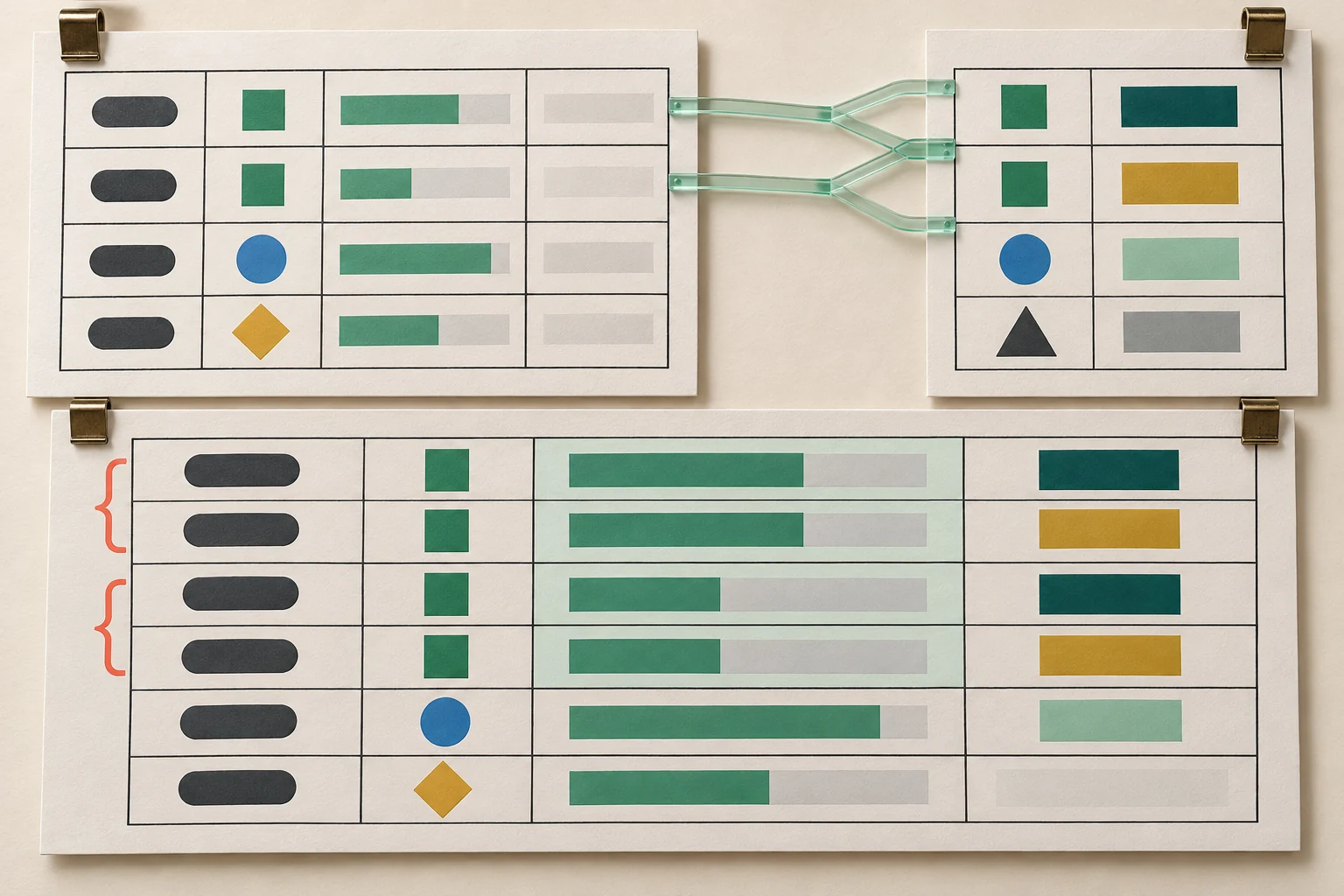
Define what a result row should represent
AI can add customer categories to orders and draft a sales analysis. During a table join, however, one order may receive several matches while another disappears. Before discussing the analysis, obtain a checkable matching record showing which source row connects to which directory row.
First, state the purpose of the result. In this procedure, one row must still represent one order; the customer directory only supplies a category. Retain a separate order identifier. Customer codes may repeat among orders because a customer can purchase several times.
A left outer join suits this task: it preserves all orders, including unmatched ones. Microsoft’s Left outer join documentation describes this behavior. Leave missing categories unknown and record the reason so that reviewers can still see those orders.
Check the keys before joining
Specify the key fields on both sides and the expected match count: here, each order may match at most one directory row. If a code is unique only within a branch, use the branch and code together. Microsoft’s Merge queries overview describes matching multiple columns; their types and order must correspond.
Ask the model to list repeated directory keys with their source rows. Repetition may indicate an error, historical changes, or several active records. W3C’s tabular data model treats repeated declared primary keys as validation errors. This warrants investigating the ambiguity rather than automatically deleting a record.
Define permitted key transformations. For example, remove surrounding spaces if the data owner confirms they are accidental. Preserve leading zeros until the rules are established. For this procedure, explicitly require that blank keys never match other blank keys; similar customer names alone do not establish a match.
An illustrative example: four orders become six rows
Consider a fictional example. The orders table contains four records: O1 — customer C11, amount 1200; O2 — C11, amount 800; O3 — C22, amount 1500; O4 — C33, amount 500. All amounts use the same hypothetical monetary unit. The original total is 4000.
The directory has four rows: D1 — C11, individual; D2 — C11, organization; D3 — C22, individual; D4 — C44, organization. C11 has conflicting categories, and C33 has no entry. Customer C44 appears only in the directory.
Expanding every exact match in a left join produces two occurrences of O1 and two of O2. O3 and O4 each appear once. The resulting six rows total 6000: the extra 2000 comes from counting both C11 orders twice.
Our procedure’s expected working result contains four orders totaling the original 4000. O1 and O2 have ambiguous categories, O3 has a confirmed category, and O4 has no match. Put D4 on the unused directory records list. Its presence does not create another order.
Ask AI to show the matches
Example request for a text model: ‘Add customer categories to the orders, preserving each order exactly once. Match only exact, nonblank codes. First show each order’s identifier, the number of matching directory rows, and their identifiers. Transfer the category for one match; flag ambiguity for multiple matches and no match when none exist. Never choose the first of several rows. Preserve original amounts. Separately list repeated keys and unused directory rows.’
Supply field descriptions and the uniqueness rule alongside the tables. Review the matching record before requesting analysis. In this example, all 4000 cannot confidently be split between individuals and organizations: orders worth 2000 have disputed categories, and 500 has an unknown category. Report those amounts separately.
Verify the result independently
Independently count the original orders and total their amounts using spreadsheet tools. Check how often each order identifier appears in the result: here, exactly once. Compare the original and resulting identifier lists to detect a substituted or missing order.
Check customer subtotals: C11 — 2000, C22 — 1500, C33 — 500. Adding categories must preserve them. Matching totals alone do not establish correct links, however: an incorrect category or switched customers can leave every total unchanged.
Run three illustrative checks on a copy. Swap D1 and D2: ambiguity must remain. Remove D2: both C11 orders must have D1 as their only match. Clear O4’s customer code: preserve the order without a match. These checks help assess rule application but do not replace checking the complete dataset.
Set limits on the procedure
Preserving the row count suits adding a single attribute to an order. If the second table contains several payments per order, multiple matches may be legitimate. Decide beforehand whether the result needs individual payments or their total per order. Do not delete repeated codes simply to tidy the result.
Several customer categories may also apply to different periods. Selecting one requires the order date and a confirmed rule for when directory records apply. Without these, the model must not declare a category current. Treat matches based on similar names as candidates requiring separate confirmation.
A small extract helps check the logic but cannot establish correctness across the full table. Before using the complete result, repeat identifier, match-count, and amount checks outside the AI’s text response. Even a successfully checked join cannot establish that the directory is accurate: an incorrect source category can pass every structural check.


