The task: make the opening action understandable
Google: Veo 3.1 Fast generates short videos from text and images and supports sound generation. Google Cloud separately confirms first-and-last-frame generation for Fast. This mode is worth considering for a product preview, a packaging animatic, or approval of an advertising scene.
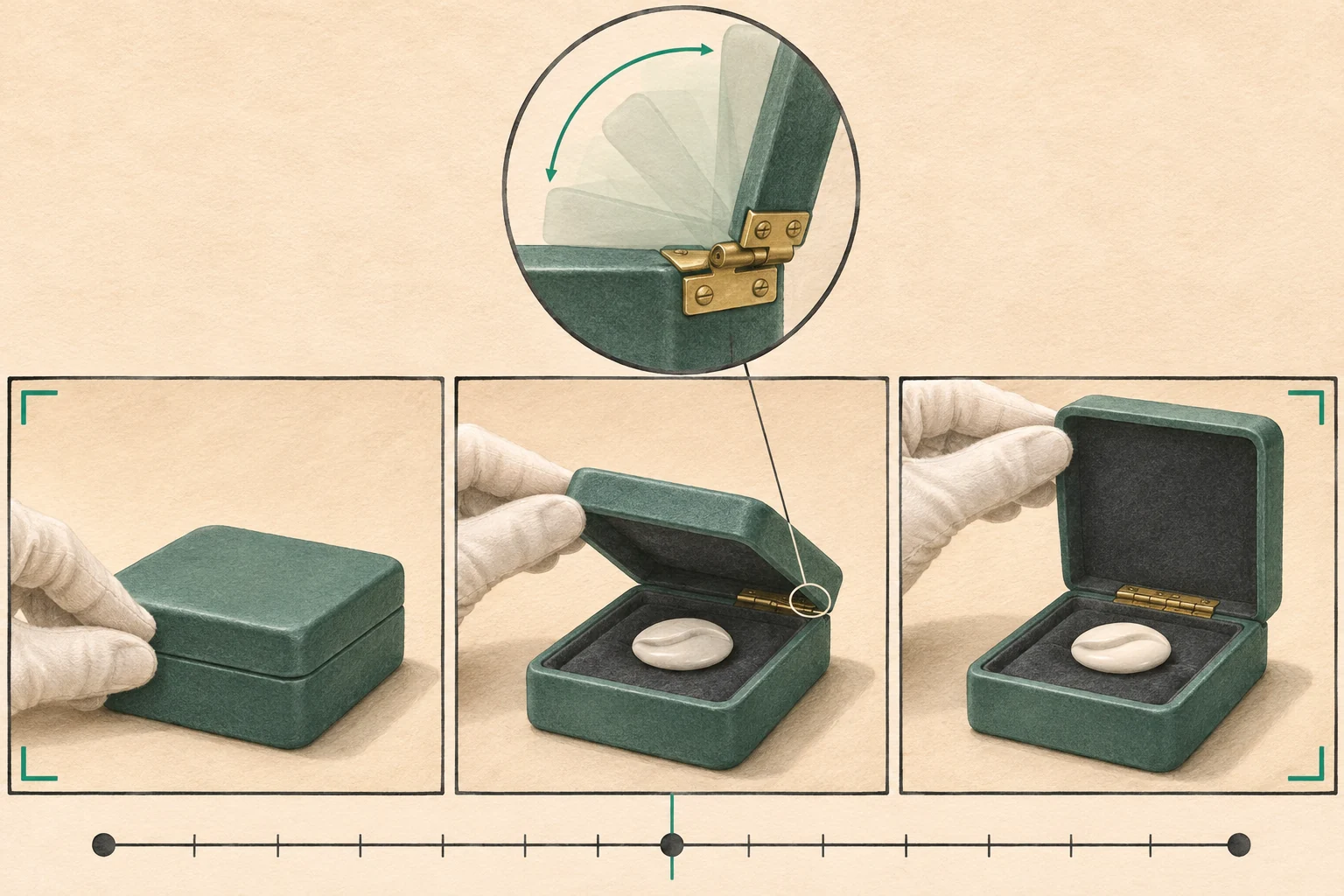
Illustrative example: a green case containing a white ceramic brooch must appear closed, then have its lid opened by a gloved hand. The practical result is one continuous shot that lets viewers understand how the case works. Matching the opening and closing images is insufficient: the path between them matters.
Prepare two images of the same scene: one with the lid closed and one with it raised upright. Preserve the base position, viewpoint, and lighting. Separately record the expected transition in the task brief: the hand lifts the front edge, the lid rotates around its rear hinge, and the base remains on the table. This becomes a review criterion for the eventual clip.
Which settings SeaGenera provides
The model is available in SeaGenera’s Playground and API. The catalog lists durations of 4, 6, or 8 seconds, aspect ratios of 16:9 and 9:16, resolutions of 720p, 1080p, and 4K, the generate_audio switch, and size. The pixel dimensions must match the selected resolution and orientation.
There is a material discrepancy: the checked Google Cloud table for Fast lists output resolutions of 720p and 1080p, while SeaGenera’s model card also includes 4K. This review therefore does not confirm 4K availability through a particular route. For the illustrative check, select eight seconds, 720p, 16:9, and audio disabled.
The first and last frames are supplied through frame_images using first_frame and last_frame. The general limit on input_references does not guarantee that the model accepts 32 images or arbitrary reference combinations. Extension through previous_job_id is not listed for this SeaGenera model card.
Seed is available, but an identical value does not guarantee identical video. Text chat parameters such as temperature and max_tokens should not be carried into a video request solely because they appear in the model’s general capability list.
Two example prompts for the same transition
Google Cloud lists English as the prompt language, so the submission examples below are in English. These are illustrative formulations, not results from paid generations. The first prompt describes the whole transition; the second addresses a specific hinge problem.
Example initial prompt with two guide frames: Single continuous product shot matching the supplied start and end images. A gloved hand lifts the sea-green case lid around its rear hinge until it is upright. The base stays planted on the table. A white ceramic brooch is revealed inside. Locked camera, constant lighting, steady opening, brief still finish. Keep the hinge attached throughout.
Example refinement prompt if the generated version has a detached lid: Repeat the same opening. The lid rotates only around the fixed rear hinge; it never lifts away from the base or bends. The hand maintains contact with the lid edge. Keep the base stationary and finish upright as in the end image. One continuous shot, no cut or dissolve.
How to check motion between the guide frames
First watch the whole clip without pausing: the action should read as a case opening. Then compare the beginning, points at approximately two, four, and six seconds, and the final frame. Check the base position, the lid’s connection to the body, and the progressive change in its tilt.
Inspect the moment when the lid first separates from the front edge particularly closely. This can reveal a substitution for the intended motion: the lid becomes flexible, the hinge moves, or the entire case rises with the hand. These are examples of possible defects, not observations from a completed test.
After checking selected frames, step through any suspicious section frame by frame. The acceptance condition is that the lid remains rigid and attached to the base, the hand maintains understandable contact, and the final position is reached without an editing jump. If the hand obscures the connection so that it cannot be checked, record the uncertainty and request a more revealing viewpoint.
How to organize attempts and preserve the review
SeaGenera creates video asynchronously: retain the task identifier and check its status. If the status is uncertain or the connection breaks, establish the state of the existing operation first. A new generation should not be used to check whether the previous one is ready.
For each attempt, record the guide images, prompt, settings, and a timestamped observation. For example: at four seconds, the rear edge of the lid separates from the body. Change one condition at a time so that you can identify what caused an improvement. Download the completed file because storage is limited. Submit a refinement only after assessing the previous result.
How pricing works and where the approach has limits
SeaGenera’s catalog prices this model per second of video; the rate depends on resolution and whether audio is enabled. For preliminary planning, two successful eight-second attempts represent 16 billable seconds at the corresponding rate. Check current pricing in the model card and on /pricing, then inspect the displayed reserve before submission. Reconcile the final amount with the confirmed charge.
First-and-last-frame generation supplies anchor states, but does not by itself establish correct mechanics between them. High resolution is likewise no confirmation that the hinge rotates correctly. Such a clip is useful for discussing a visual concept; an accurate demonstration of the construction requires a separate motion check and confirmation that it matches the real case.


