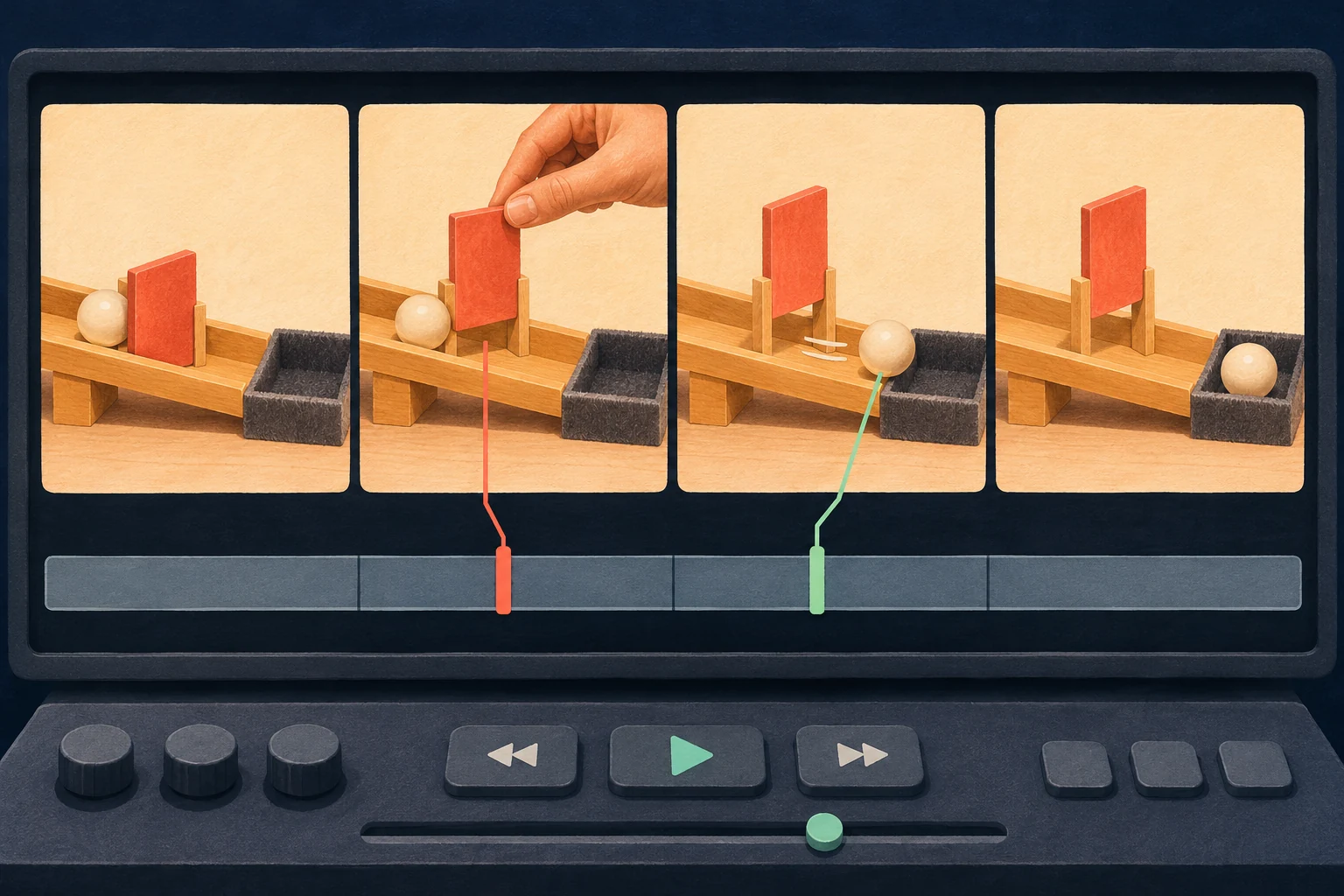
The task: make the sequence understandable
Google Cloud positions Veo 3.1 Lite for repeated video iteration. One practical scenario is a short educational insert in which viewers need to understand how two actions depend on each other. Reviewing a specific event sequence is more useful here than judging the clip solely by its attractive lighting and materials.
Fictional example: a marble rests on an inclined wooden track, held by a coral gate. A hand raises the gate, the passage opens, and the marble then rolls into a padded receiving tray. The explanation requires the marble to start moving after the passage opens, with its movement visibly connected to the hand’s action.
The deliverable is a short clip with verified event order and a record explaining its acceptance. The prompts and review procedure below are illustrative, rather than model test results. No generations were run for this review. This scenario could serve as an explanatory storyboard or a preliminary educational animation.
Start with a state map
Define four states for the example. Initially, the gate blocks the track and the marble remains still. Next, the hand raises the gate without touching the marble. Once sufficient clearance appears, the marble rolls down. Finally, it rests in the tray while the gate remains raised. Each state must be distinguishable from the chosen viewpoint.
An example rhythm for the eight-second scene allocates the first second to the initial position, the next two to opening the passage, three to movement, and the final two to the ending state. This is an editorial plan whose execution still needs checking. Specifying times in a prompt does not establish that the model will follow those intervals.
Define the critical failure beforehand: the marble visibly moves downhill while the passage remains blocked. Also allow an uncertain outcome: the hand obscures the gate at the moment of release. Suitable opening and closing frames still cannot establish event order in that case. The staging needs greater clarity.
Settings available in SeaGenera
According to the supplied documentation snapshot dated November 8, 2026, the model is available in SeaGenera’s Playground and video API. Its card offers durations of 4, 6, or 8 seconds, 720p or 1080p resolution, 16:9 and 9:16 aspect ratios, and the generate_audio switch. For this example, choose 8 seconds, 720p, 16:9, and audio off: event order will be reviewed visually.
First and last guide frames are supported by the card and documented for Lite by Google Cloud. However, Google marks the separate reference-image mode for preserving objects’ appearance as unsupported for Lite. The general input_references field, with its maximum of 32 items, therefore should not be treated as permission to use that mode. Our example uses text alone.
Lite does not list 4K output. Extending an existing video through SeaGenera is unavailable under this snapshot: the card has no previous_job_id parameter. The seed field is marked as boolean; this snapshot does not confirm a numerical seed. General text parameters such as temperature, top_p, and max_tokens in supported_parameters should not be transferred into video request settings either.
Two illustrative prompts
The first example prompt uses English, which Google Cloud lists among Lite’s prompt languages: “A single uninterrupted side view of a short wooden marble ramp on a table. One ivory marble rests against a coral sliding gate. A hand lifts the gate upward until the passage is open. Only then does the marble roll down into a shallow felt-lined tray. Keep the hand clear of the marble. Static camera, entire ramp visible, steady lighting, no cuts, no text.” This specifies an observable action against which the result can be accepted or rejected.
If the order is difficult to distinguish, an example clarification for the next generation is: “Keep the opening moment still. Show a visible gap above the marble before it begins moving. The hand touches only the gate; the camera never cuts away.” Add this to the original description; it is not an instruction to repair an existing file. Keep the other conditions unchanged to assess whether clarifying the sequence helped.
How to review the finished clip
First, watch the entire clip at normal speed. Then locate three events frame by frame: the first moment the passage has sufficient clearance, the marble’s first noticeable displacement relative to the track, and its arrival in the tray. Record the available timestamps and a brief observation. Do not assign greater measurement precision than the player provides.
A fictional review log might record clearance at 2.7 seconds, movement beginning at 3.0, and arrival at 5.9. These numbers demonstrate the recording method and are not Veo 3.1 Lite measurements. If movement starts before visible clearance, reject the sequence. If both events are distinguishable only within the same frame, their order remains uncertain.
Also check that the gate opens once, the marble travels down the track once, and the hand does not push it. An attractive ending cannot compensate for a missing intermediate action. For an educational insert, ask another person to describe what they saw without your explanation: they should mention the passage opening before the marble rolls.
Limitations, cost, and release decisions
Correct on-screen order establishes compliance with the scenario, rather than the mechanism’s physical accuracy. This animation cannot establish friction, a real marble’s speed, or the gate’s reliability. If the educational material explains an actual product, compare the scene with a real demonstration. Clear action matters more than elaborate wood grain in this example.
SeaGenera’s catalog prices Lite per second, with the rate depending on resolution and audio. If the selected mode costs R rubles per second, an eight-second clip calculates as 8 × R, and three successful generations as 24 × R. This illustrates the formula, not a current rate. Before submitting, check the model card, /pricing, and displayed reserve; the final charge follows the confirmed cost.
Video generation runs as a job. Wait for its result; if the status is uncertain, check the history before creating another paid attempt. Watch the downloaded finished file again at normal speed. Release the scene when its event order is understandable without explanation and the review log contains no unresolved uncertainty about the marble’s release.


