What a line sketch can become
OpenAI: GPT Image 2.5 Flare accepts text and images and produces images. OpenAI positions it for fast everyday image generation. Here we examine a specific task: showing a product’s materials from a line sketch while preserving the arrangement of its parts. The official GPT Image 2.5 guide demonstrates drawing-to-render workflows.
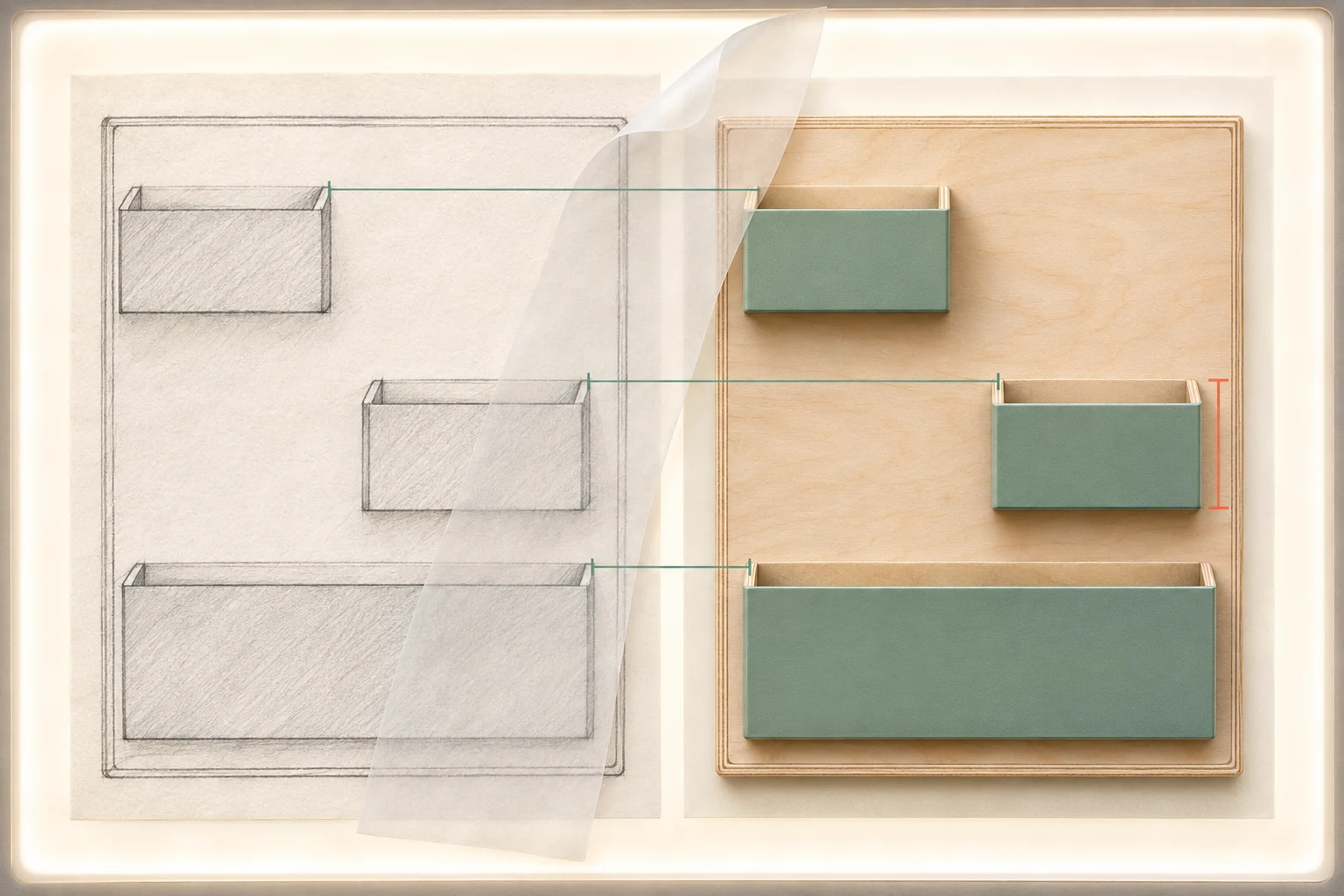
Our fictional example is a wall-mounted postcard holder with three staggered pockets. The rendering supports a discussion of its appearance before manufacturing. It should represent the original concept: if the model aligns the pockets into identical rows, it creates a different design.
All requests below are illustrative; no paid generations were performed. The proposed deliverable is an image accompanied by its source sketch and a verification record. Together, these make it possible to show exactly which design the selected version illustrates.
Prepare a map of the parts
Draw the holder directly from the front against a plain background. In this illustrative example, the rectangular panel has 3:4 proportions. The upper pocket sits on the left, the middle pocket on the right, and the lower pocket spans most of the width. Show clear pocket boundaries without postcards or decorative objects obscuring their edges.
Record horizontal boundaries relative to the panel’s own width: the upper pocket extends from 10 to 50 percent, the middle from 50 to 90, and the lower from 10 to 90. Their respective widths are 40, 40, and 80 percent. This is our illustrative specification, not a model capability claim.
Separately list the features that must remain unchanged: three pockets, their order from top to bottom, the rectangular outline, and the empty spaces between parts. Materials can be provisional, such as pale plywood with matte green pocket fronts. Thickness, attachments, and depth absent from the sketch remain design assumptions.
Two example requests
Example initial request: “Turn the attached front-view sketch of a wall-mounted postcard holder into a realistic rendering. Preserve the outer outline, three pockets, their placement, and relative widths. Use pale plywood with matte green pocket fronts. Show a direct front view, soft lighting, and clearly visible boundaries. Leave the pockets empty. No additional parts or lettering.”
Example request for a hypothetical error: “The first reference is the source sketch; the second is the rendering to correct. The upper pocket should extend from 10 to 50 percent of the panel’s width, but it has been stretched in the second image. Restore its right boundary to the sketch position. Preserve the other pockets, materials, lighting, and front view.”
Submit the second request as a separate operation with two references. Their order must match their descriptions. Keep both outputs for comparison: correcting one pocket does not establish that the remaining parts stayed intact, so the edit requires a complete verification again.
SeaGenera settings and interface boundaries
According to SeaGenera’s catalog and documentation snapshot dated November 12, 2026, the model is available in Playground and through /v1/images using openai/gpt-image-2.5-flare. For this example, select aspect_ratio 3:4 and n equal to 1. The catalog allows 1–10 outputs and up to 16 reference images in input_references.
The quality options are auto, low, medium, high, xhigh, and max; background accepts auto, transparent, and opaque. You could start with medium and opaque. The card also lists output_compression from 0 to 100; OpenAI applies this parameter to JPEG and WebP. Keep settings identical when comparing attempts.
A separate editing mask and arbitrary pixel dimensions are not documented for this card in SeaGenera: the examples above use references and an aspect ratio. Direct OpenAI API capabilities do not automatically carry over here. SeaGenera documents streaming previews for this model, but verification requires the completed image.
Check placement before materials
Open the sketch and output in an ordinary image editor. Crop copies to the panel’s outer boundaries and resize them equally. Do not stretch individual parts. If the output shows a noticeable side angle, horizontal proportion comparisons become unreliable: first obtain a version with a direct front view.
Check the pocket count and order, then measure each pocket’s width relative to the panel. For example, an upper pocket measuring 60 percent instead of the specified 40 differs by 20 percentage points. You could set a tolerance of three percentage points beforehand for this exercise; it is an editorial requirement, not a model accuracy standard.
A semitransparent sketch overlay can reveal displaced boundaries. Inspect the object’s actual edges, since shadows can imitate additional ones. Assess texture and color only after geometry. In the verification record, describe each discrepancy and the decision: correct it, accept it as an approved design change, or reject the version.
Cost and limits of use
SeaGenera’s catalog states that this model’s cost depends on actual tokens, output dimensions, and quality; text and references are accounted for separately. Do not treat one request as a fixed-price purchase of one image. Check current rates and billing units in the model card and on /pricing before submitting.
Playground displays a reserve that can substantially exceed the final cost for image models billed by tokens. The unused portion is returned after the charge is confirmed. For your budget, allocate separate attempts for the initial rendering and a possible correction, then calculate total spending per accepted version.
OpenAI warns that precise element placement in structured compositions can be difficult. Flare is therefore worth considering for appearance discussions with manual layout verification. An image does not establish strength, capacity, or manufacturing suitability: those require dimensions, construction details, and separate checks. Resolve unknown details before handing over the design.


