Where Sunburst fits this task
OpenAI: GPT Image 2.5 Sunburst generates and edits images using text and visual inputs. OpenAI’s model page highlights workflows where editing precision matters. This review considers previewing a pattern on a curved surface while preserving the photographed object.
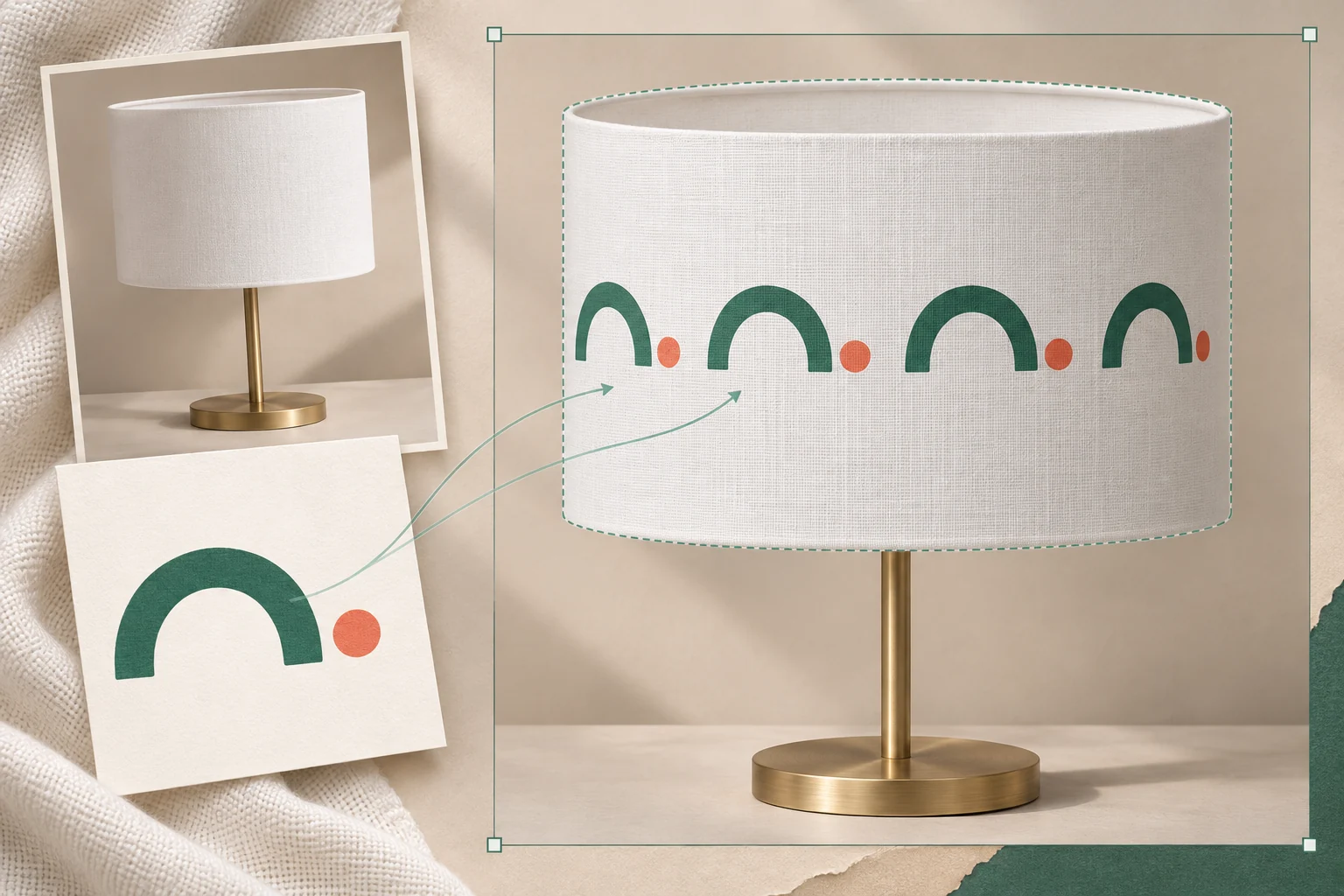
Fictional example: a white cylindrical lampshade on a brass stand needs a printed pattern. The supplied motif contains a sea-green arc with a coral dot to its right. The desired preview shows four complete motifs in one horizontal row on the visible front surface.
The intended deliverable is an illustration for discussing a design. The prompts and rejection example below form an illustrative procedure. No paid generations were run, and no output quality or processing time was measured.
Give the two references separate roles
Prepare a photograph of the unlit lamp and a separate, flat image of one motif. Keep the shade’s upper and lower edges visible. Crop the motif reference to remove interface elements and unrelated objects.
Assign each reference a role: the first defines the object, camera angle, and lighting; the second supplies only the printed motif. OpenAI’s GPT Image 2.5 guide illustrates combining images with explicitly assigned roles.
Before submitting, record the boundaries of the intended print: the shade’s outer fabric only, with white margins above and below. Define which details must remain unchanged, including the stand, tabletop, and shadow.
The initial request and a targeted correction
Example initial prompt: “Image 1 is the original scene; image 2 supplies the motif. Apply four complete motifs from image 2 in one horizontal row on the visible front of the lampshade in image 1. Follow the cylindrical surface and perspective. Keep the dots to the right of their arcs. Preserve the white upper and lower margins, shade shape, stand, tabletop, lighting, and shadow. Add no lettering.”
Example correction prompt, adding the previous result as image 3: “Image 1 is the original lamp, image 2 is the motif, and image 3 is the version to correct. Fix only the mirrored motif on the right in image 3: its dot belongs to the right of the arc. Preserve all four motifs, their scale and positions, and the original scene.”
Request a correction when its specific defect has been identified. Keep the original references for every attempt. If successive edits change the lamp’s structure, return to the original pair of images.
SeaGenera settings and supported modes
SeaGenera settings were checked against the catalog and supplied /docs and /docs.js snapshot dated November 6, 2026. Use Playground’s image mode or /v1/images with input_references. The catalog permits 1–10 output images and up to 16 references. Start with one output.
Available aspect ratios are 1:1, 3:2, 2:3, 4:3, 3:4, 16:9, 9:16, 21:9, and auto. quality accepts auto, low, medium, high, xhigh, and max; background accepts auto, transparent, and opaque. For this example, start with 3:2, medium, and opaque. Higher quality does not guarantee a correct pattern transfer.
This card lists no separate resolution or file-format selector. output_compression ranges from 0 to 100 and applies to JPEG/WebP; omit it for PNG. Options in OpenAI’s direct API do not automatically become SeaGenera settings.
SeaGenera documents neither an editing mask nor a separate /v1/images/edits method. Its mode for combined text and image output is unavailable here: this model outputs images only. The catalog indicates image streaming, but acceptance requires the completed file.
How to check the transferred pattern
First compare the complete scene with the original photograph. Check the shade’s outline, upper and lower ellipses, stand position, and tabletop shadow. An overlay in an image editor can help reveal displacement; visual similarity alone does not establish pixel equality.
Then inspect the pattern. Count four complete motifs, check every arc–dot relationship, and confirm that nothing crosses the white margins. Motifs near the sides may appear narrower because of perspective. Requiring identical pixel widths across a curved surface would be inappropriate.
Illustrative rejection: all four motifs are visible, but one coral dot extends onto the brass stand. That version fails the print-boundary requirement. Record the location and defect, correct that specific issue, and repeat both checks.
Pricing and practical limitations
SeaGenera’s price for this model depends on token consumption. Text, reference processing, and generated image tokens contribute separately; output size and quality affect the amount. Check current SeaGenera rates in the model card and on /pricing before submitting.
Playground shows a reserve that may exceed the final charge. Unused funds return after the cost is confirmed. For a planned sequence of an initial preview and a correction, budget for two paid operations, including the references submitted again.
A convincing preview cannot establish physical print dimensions, exact ink color, or the appearance of fabric under real lighting. Keep production artwork separate and verify a physical proof. Where untouched regions must remain pixel-identical, composite the approved print into the original photograph in an editor.


