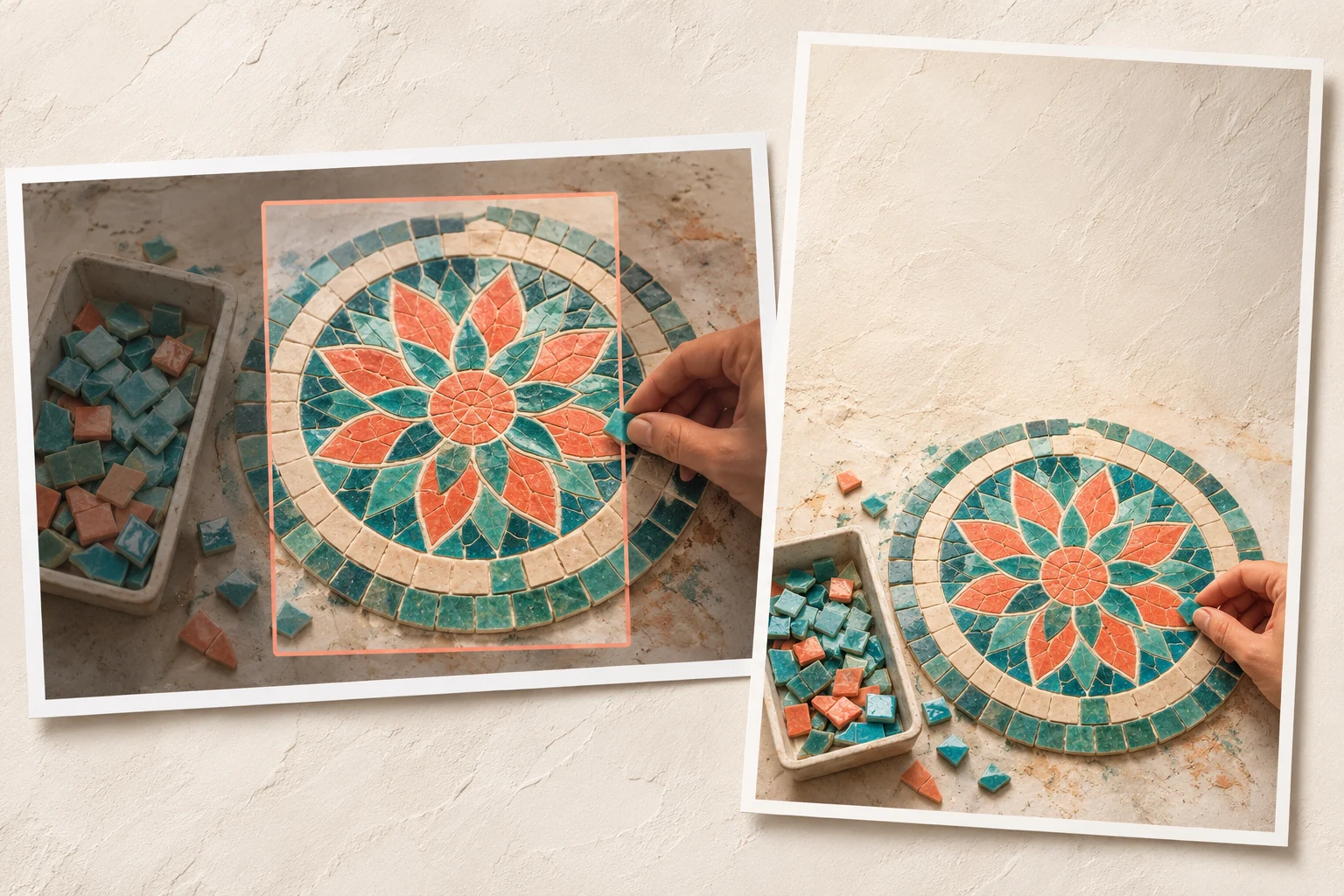
One scene for two formats
xAI: Grok Imagine Image 2.0 can create images from text and edit existing pictures. The official xAI SDK README demonstrates both workflows with this exact version, while the Python SDK changelog confirms its low and medium quality modes. We will examine a specific task for the model: making a portrait cover from a landscape illustration while preserving a recognizable action.
The illustrative example is a fictional mosaic workshop announcement. In the original 16:9 illustration, one hand places a turquoise tile near the right edge of a round mosaic, with a single tray of pieces on the left. The required version is 9:16, with space for a headline above. All requests below are illustrative; no paid generations were performed, and no actual model outputs are evaluated here.
Try an ordinary crop first
Open the original in an editor and overlay a 9:16 crop frame. Keeping the original height, this frame captures about 32% of a 16:9 image's width. Move it around: can it contain the hand, mosaic, and tray together? If the action remains clear and the headline fits, an ordinary crop can complete the task without another generation.
If the tray disappears or the hand gets cut off, define the permitted changes. In our example, these include showing more wall above and tabletop below, and slightly repositioning the working group. Preserve the hand's position relative to the mosaic, the turquoise tile on the right, and one tray on the left. This list helps distinguish a useful recomposition from a different scene.
Settings available in SeaGenera
The supplied SeaGenera catalog and documentation snapshot dated October 25, 2026 lists 1K and 2K resolution, low and medium quality, and selectable aspect ratios including 16:9 and 9:16. Each request produces one image and accepts up to three references. For this illustrative adaptation, select 9:16 and explicitly fix resolution and quality so attempts use comparable settings.
Use Playground's image mode or the /v1/images API; source images go in input_references. Streaming output is unavailable for this model. The seed and temperature entries in the general supported_parameters list are not confirmed settings for its media mode. Although xAI's direct SDK describes up to five source images, SeaGenera's limit is three. A conversational mode returning text is also not documented for this model.
Two illustrative requests
Example first request with one source image: “Create a portrait 9:16 composition from the attached workshop illustration. Preserve the round mosaic, the hand above its right edge, the turquoise tile, and the single tray on the left. Leave the upper quarter clear for a future headline. Show more wall and tabletop while preserving the viewpoint and lighting. Add no objects or lettering.”
Also select the aspect ratio in the form: mentioning 9:16 in the request alone does not adequately control the format. Save the request alongside the original. If an output loses the tray, record that specific defect. Asking to “make it better” does not explain which relationship between elements needs restoring.
Example corrective request: “The first attachment is the original scene; the second is the version to correct. Restore one tray to the left of the mosaic using the first attachment. Preserve the second version's clear upper quarter, hand position, and turquoise tile on the right. Make no intentional changes to other elements.” This is a separate attempt with two references, rather than a continuation of a text conversation.
Check that the action survives
Place the original and portrait version side by side, roughly matching the mosaic's apparent size. Inspect the working hand, tile placement, mosaic pattern, and tray in turn. Count the objects: a second tray or an extra hand changes the scene even when neatly rendered. Then enlarge the fingers and tile edges, where merged details may be invisible in a thumbnail.
Temporarily place the actual headline in the layout's upper quarter and view the cover at its publication size. Check whether the text overlaps the hand or the tray has become too small. Ask someone else to describe the action without prompting. Acceptance in this illustrative example requires all four reference elements and a readable headline; attractive lighting alone does not establish this.
Calculate the cost of attempts
In SeaGenera, this model's output price depends on the resolution and quality combination; processing each reference adds a charge. The first attempt described here uses one source, and the second uses two. If both run with identical settings, the plan includes two output image charges and three reference charges. This explains the calculation rather than quoting current prices.
Check current rates in the model card and on /pricing before submitting. Playground displays a preliminary reserve; the final charge is reconciled after execution. Save each attempt's cost with its review notes to assess spending per usable cover, including rejected versions.
When manual editing is appropriate
Reference editing does not guarantee unchanged source details. A request can demand scene preservation, but the entire output still needs review. Raising quality to medium or resolution to 2K does not establish that the hand, pattern, and object arrangement survived. If a defect recurs, consider moving the usable parts into an ordinary editor and finishing the composition manually.
This workflow suits editorial illustrations and announcements where an approved reinterpretation is acceptable. For a documentary workshop photograph or an exact product image, generative additions may introduce details that never existed; changing the layout around the original is then safer. Keep the source illustration, portrait version, settings, and accepted changes so the next adaptation starts from reviewed material.


