The task: show an exhibition stand’s depth
The identifier grok-imagine-video-1.5-lite appears in SpaceXAI’s official SDK changelog. OpenRouter’s listing confirms video generation from text and an image. Here we examine one task: a short lateral camera move past a stand model. All prompts below are illustrative examples; no paid generations were performed for this review.
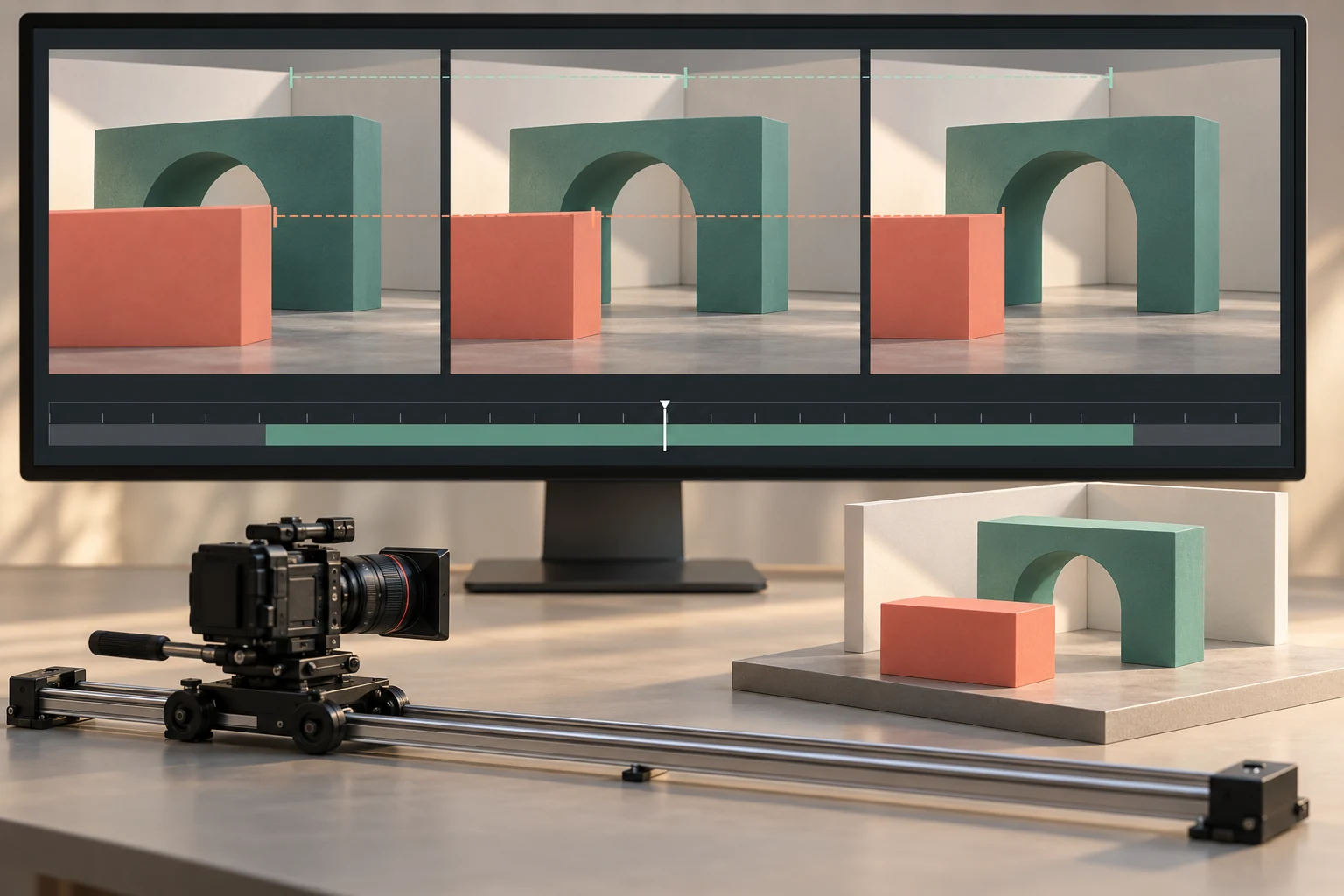
The fictional model contains a coral plinth in the foreground, a green arch behind it, and a white rear panel. The objects remain stationary. The camera moves right, gradually revealing an area of the arch previously hidden by the plinth. This clip could support discussion of a stand concept or a draft exhibition announcement.
The practical deliverable is a continuous segment that makes the objects’ arrangement understandable. Before generating, record the requirements: the plinth retains its shape, the arch remains intact, and the camera moves in one direction. This procedure does not establish exact dimensions or correspondence with a real design.
SeaGenera settings and availability boundaries
According to the SeaGenera snapshot dated October 27, 2026, the model is available in Playground and the API. Its card lists 480p, 720p, and 1080p resolutions, durations from 1 to 15 seconds in one-second increments, and aspect ratios of 16:9, 9:16, 1:1, 4:3, 3:4, 3:2, and 2:3. The first frame is the listed guide frame.
A last frame, video continuation, seed, and audio controls are not declared for this card. SeaGenera’s general documentation and the developer’s SDK describe broader capabilities, but these cannot be assumed for Lite. An input_references field with a maximum of 32 also does not guarantee acceptance of that set: compatibility is checked separately. This scenario uses only a first frame.
For the example, choose six seconds, 720p, and 16:9. OpenRouter states that 1080p output is upscaled from 720p. The 1080p label therefore does not establish additional original detail. Assess geometry and movement first, then decide whether another file size is needed.
Two illustrative prompts
Example prompt without an image: “A tabletop exhibition stand model. A coral rectangular plinth in the foreground, a green arch behind it, and a white panel farther back. All objects remain stationary. The camera moves slowly right, parallel to the stand’s front plane, without rotation or zoom. The foreground plinth gradually reveals the obscured arch. One continuous shot, constant soft lighting, no people or lettering.”
Example prompt with a first frame: “Use the attached image as the beginning. Preserve the arrangement of the plinth, arch, and rear panel. The camera moves smoothly right, parallel to the stand, without rotation or focal-length changes. Objects remain stationary, retaining their edges and connections. The arch gradually becomes visible behind the plinth. Lighting stays constant.”
Set duration, resolution, and aspect ratio separately. The first version supports discussion of an invented composition; the second lets you check preservation of an approved view. These are different workflows. Comparing their clips alone cannot establish which mode is more reliable because their starting conditions differ.
Check whether the camera actually translates
Open the resulting file in a player or editor. Compare its first, middle, and last frames without additional cropping. Choose two landmarks: a vertical edge of the nearby plinth and a corner of the distant panel. Track their positions relative to the image’s left edge, keeping the viewing scale unchanged.
For the requested rightward movement without rotation, stationary objects should shift left in the image; the nearer landmark generally shifts farther than the distant one. This is parallax. If objects only grow larger, check whether an approach has replaced the lateral move. If both landmarks travel identically, the result may resemble a sliding flat picture. These signs flag suspicious sections without proving three-dimensional accuracy.
Inspect the arch’s reveal behind the plinth separately. Newly visible surfaces should emerge gradually, without a jumping edge or an extra support. A single image does not show hidden surfaces, so their correctness cannot be established from the starting frame. Checking a real design requires additional images or the physical model.
Acceptance criteria and corrections
Example acceptance rule: require four continuous seconds with consistent movement direction, no plinth deformation, an intact arch, and no sudden appearance of the revealed area. Record the usable interval’s boundaries. An attractive final frame cannot compensate for a defect inside the selected segment.
If an approach replaces the lateral move, specify movement parallel to the stand at a constant distance from its front plane. If a large displacement causes deformation, try shortening the described camera path while retaining the duration. Change one condition per attempt and repeat the landmark check. This investigates an error without promising a fix.
A successful segment can support visual discussion when its illustrative nature is clear to the recipient. Use verifiable project materials to demonstrate exact construction, hidden fittings, or dimensions. Increasing resolution cannot restore geometry that the model altered or invented while revealing a surface.
Pricing, waiting, and saving the result
SeaGenera prices this model by video seconds: multiply duration by the selected resolution’s rate, then add a separate charge for a starting frame. The six-second example therefore costs six seconds at the applicable rate plus the frame charge when used. Check current values in the card and on /pricing, and inspect the reserve before submitting.
SpaceXAI’s official SDK documentation describes video as a background job whose readiness is checked afterwards. In SeaGenera, likewise wait for the existing job’s outcome. If its status is uncertain, avoid automatically creating another generation: check the history and existing operation first. The reserve differs from the final confirmed charge.
Download the completed clip promptly because storage is limited. Keep its settings, prompt, and accepted interval alongside the file. Tell the editor what was checked: smooth camera travel, preservation of visible details, and no jumps. That conclusion applies to the selected segment, not every future generation from the model.


