Check the sequence first
An attractive PDF does not reveal the sequence in which software will receive its text. If lines from two columns become interleaved, AI may associate one event’s time with another event’s name. Before asking for an announcement or document-based answers, check the material you intend to give the model.
W3C’s PDF3 technique describes this problem: incorrect tagging can cause a reading tool to move across columns. In a tagged PDF, reading order primarily relates to tag order. For an AI task, the practical inference is that the sequence produced by a particular extraction process needs its own check.
The result should be a working text copy with a clear block sequence and connections to source pages. Keep a short record of the pages reviewed and corrections made alongside it. This helps distinguish a preparation error from an error in the subsequent analysis.
Establish what input the model receives
Choose a page with several columns and copy its contents into a plain text field. Read the result from top to bottom. Check whether headings still precede their paragraphs, whether an illustration caption interrupts a sentence, and whether text continues in the correct place.
If you cannot select the text, the page may contain an image without an accessible text layer. W3C PDF7 describes converting scans into text through OCR and then checking completeness and sequence. Being able to select words does not itself confirm accurate recognition.
Also distinguish a text copy from visual document processing. Google describes Gemini’s PDF understanding as considering text and images. This provides different input from pasted text: information about the relative positions of page elements may remain available.
SeaGenera’s documentation provides different PDF processing routes; availability depends on the selected model and processing mode. Check the model card’s supported inputs. If the service’s intermediate text is unavailable, checking your copied text only evaluates that copy. To examine the actual processing route, separately request extraction from a page whose block arrangement you already know.
Map the page
The proposed procedure starts with the original. Divide the selected page into meaningful blocks: a heading, paragraph, list item, caption, or sidebar. Give each a simple reference, such as “page 4, left block 2.” Then manually record the expected reading sequence.
For each block, note its opening and closing words, associated heading, and position in the sequence. These anchors help reveal a missing middle or a jump into the neighboring column. Track page numbers and repeated running headers separately so they do not accidentally become part of the main text.
For a long document, first locate different layout types: a standard page, a spread with columns, and a page with a sidebar and text continuing onto another sheet. Record which types you checked. Success on the first page does not establish quality elsewhere; pages needed for the final conclusion require their own review.
Example: two workshops in one brochure
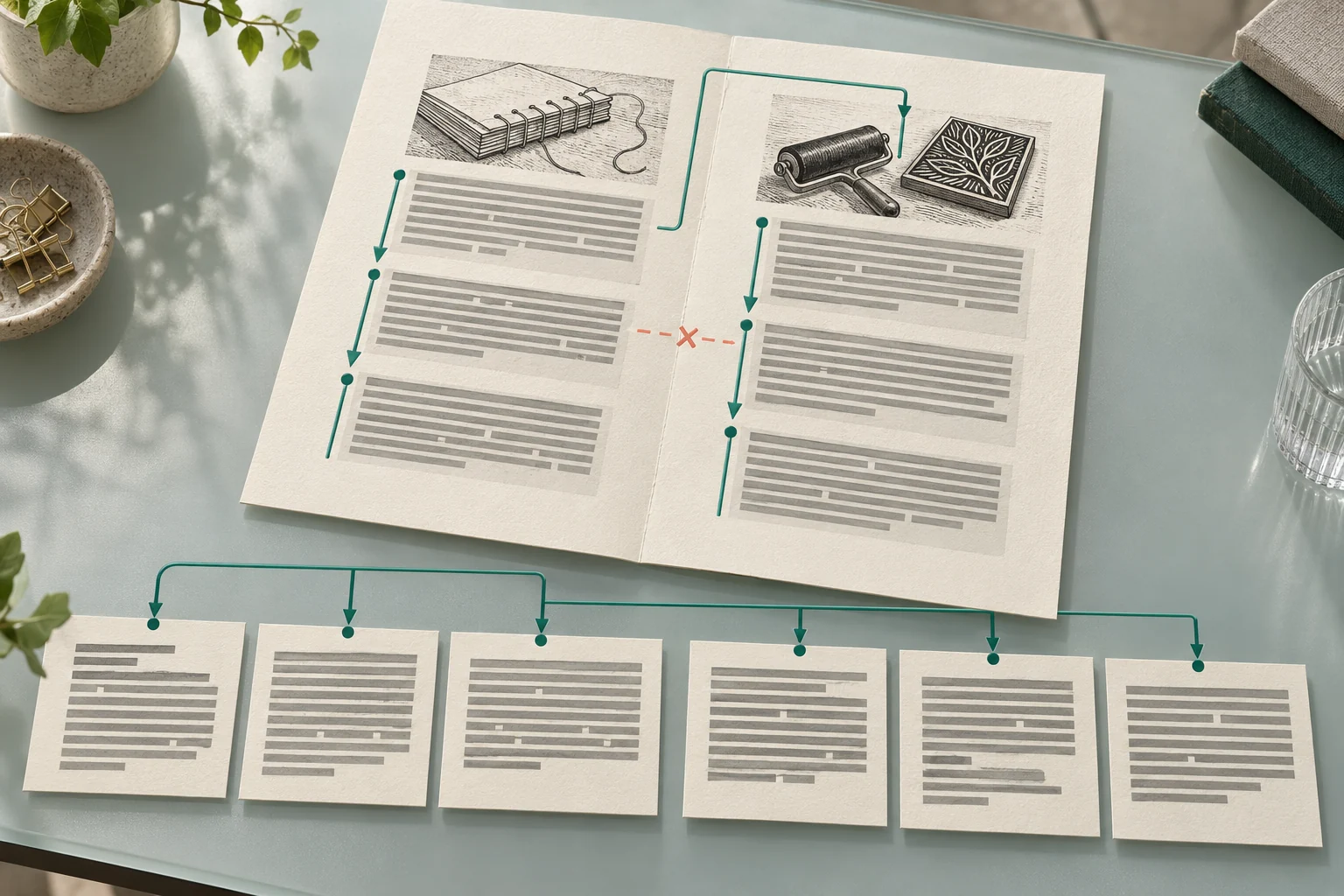
Consider a fictional example. The brochure’s left column presents “Bookbinding”: it starts at 11:00, and participants need a notebook. The right column presents “Linocut”: it starts at 15:00, and materials are provided on site. Each column contains three blocks: title, time, and participant preparation.
The correct working copy presents the three left blocks in sequence, followed by the three right blocks. A faulty extraction might collect both titles first, then both times, then both instructions. Every word survives, but the connection between each event and its conditions becomes unclear. Asking AI to “make the text coherent” cannot reliably recover that lost connection.
If the selected mode can read a page image, an example request is: “Extract the text as separate blocks. Read the entire left column first, then the right. For each block, state its position and associated heading. Explicitly mark illegible passages and add nothing.” This is an assignment for checking, not a report of a completed test.
Compare blocks and transitions
Place the original beside the resulting copy. Locate the corresponding passage for each block, comparing its beginning, ending, and intervening content. Check that it appears once, retains its associated heading, and has not absorbed neighboring column text. Keep missing passages visibly unresolved until corrected.
In our example, acceptance requires all six blocks and the correct transition from bookbinding preparation to the linocut heading. Also verify the associations: bookbinding — 11:00 — notebook; linocut — 15:00 — materials provided. Matching block counts alone does not establish that these connections survived.
Record each discrepancy with its page, block, expected position, actual error, and correction. If the viewer’s page numbering differs from the printed numbering, retain both. After making a correction, check adjacent transitions again: moving one paragraph may have left its caption or continuation behind.
Correct the copy and define its limits
A small number of sequence errors can conveniently be corrected manually against the original. For recurring failures, revisit the source document and its structure. W3C PDF3 recommends establishing logical order in the authoring tool before export. After exporting again, repeat the same check.
For visual input, Google recommends correctly oriented pages without blur. A clear image still requires comparison with the result. Small captions, handwritten annotations, and complex diagrams may need separate examination; restoring paragraph order does not establish that their contents were interpreted correctly.
Keep the original, verified copy, and record of reviewed pages together. If the PDF version or extraction method changes, recheck the affected pages. Give AI the approved copy or verified visual input. Conclusions involving unchecked pages should remain a separate, unfinished part of the work.


