Start with a question about the diagram
Before analyzing a diagram, identify what must be distinguished: a line style, fastening symbol, arrow direction, or label. This determines the attachments. A question about an optional accessory may require a small drawing area and explanatory symbols from another page.
Anthropic’s “PDF support” documentation describes PDF processing that supplies the model with page images alongside extracted text. However, having a page in the input does not establish that every detail was read correctly. Check the information needed for your question.
The practical output is a small package connecting a detailed crop to its full page and explanatory notes. A person should be able to use it to verify the answer, locate the relevant original passage, and understand what information the model actually receives.
Example: an optional clip in a drawing
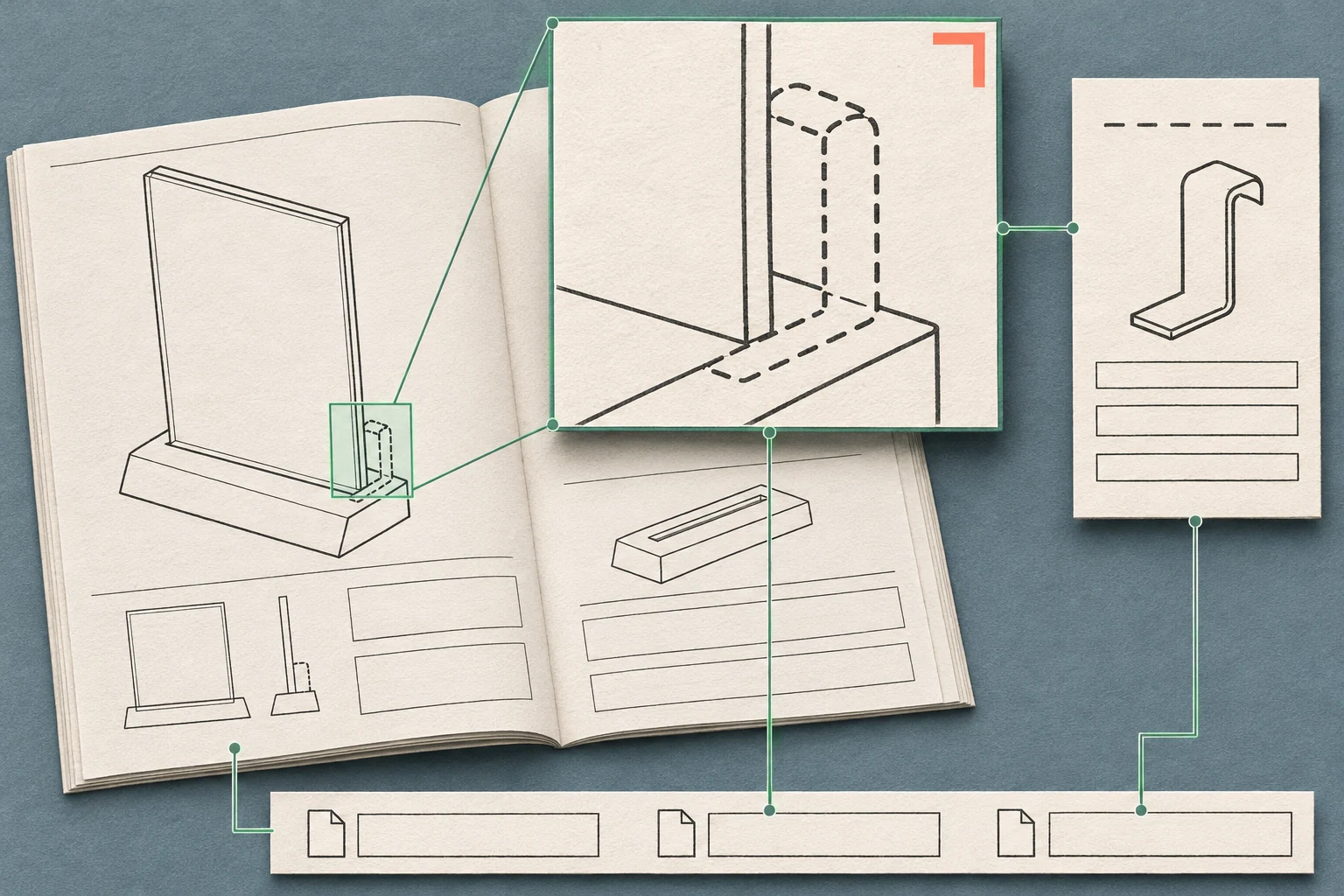
Consider a fictional tabletop menu holder booklet. File page eight shows the holder: its body uses solid lines, while a small rear clip uses dashed lines. A legend on page two explains that dashed lines indicate an optional accessory sold separately. The question concerns the clip’s status.
A tight crop around the clip shows its shape but loses the explanation of the dashes. A full-page image preserves the arrangement, but the clip appears small. For this example, prepare the full eighth page, a separate detailed crop, and the legend from page two.
The expected conclusion under these fictional conditions is that the clip is designated as optional. No generation or model accuracy measurement was performed here. This predetermined answer checks the prepared package; it also does not establish the contents of a particular order or product availability.
Connect the excerpts to the original
On a copy of the overview, outline the relevant area with a thin border, retaining a clean page version. Save the detailed crop without a border covering diagram lines. Include where the clip meets the body: this helps identify the part shown in the enlargement.
For each attachment, record the source document’s name, revision, file page, and image purpose. Use PDF viewer page numbers, as Anthropic recommends. If a different number is printed on the sheet, retain both and clearly identify which one refers to the file.
Explain the relationship in the accompanying text: the first image shows the full page, the second is its detail, and the third contains the legend from the same booklet. Identify the diagram covered by that legend. Repeat page numbers and attachment purposes in the message to make the connection explicit.
Prepare readable images
Google’s document processing documentation recommends orienting pages correctly and avoiding blurry, low-contrast scans. Before saving, check that the diagram is upright and the dashes remain distinguishable. Correcting rotation before selecting the crop boundaries helps with this preparation.
Anthropic’s “Vision” guide warns that large images may be downscaled during processing and recommends preserving important context when cropping. The proposed package therefore combines an overview with a separate detail. Enlarging one object should preserve its connection to the rest of the drawing.
For example, the relevant area in a 2400 × 3200-pixel page image might occupy 600 × 800 pixels. Save it separately from the original image. These illustrative dimensions are not universal settings. Open the saved file and compare its lines with the original; file dimensions alone do not establish readability.
Check the package and any subsequent answer
Before submission, ask another person to find the clip, its line style, and the explanation using only the prepared attachments. Then have them locate the corresponding places in the original PDF using your descriptions. Any missing connection means the package or accompanying text needs revision.
Test the boundary of the available information by temporarily removing the legend from a copy. In this fictional example, the remaining drawing cannot establish what the dashes mean because no other explanation exists. This manual check identifies the attachment needed for a supported conclusion. It requires no model call.
If you subsequently obtain an AI answer, check three things: it concerns the rear clip, reads the line style correctly, and takes its meaning from the attached legend. Request the supporting page and area, then verify them yourself. A correct final sentence with faulty supporting reasoning needs correction.
Account for the limits of preparation
Cropping helps isolate existing information. If the original scan cannot distinguish solid and dashed lines, obtain a better copy or leave the question unresolved. A generatively reconstructed drawing cannot serve as evidence of what the original depicted.
Even a readable package cannot guarantee correct interpretation. It may contain an unsuitable legend or a diagram from another product revision. Check the provenance of all parts together. An answer based on one drawing applies to that drawing; actual shipment contents require the relevant documents.
In SeaGenera, check the selected model’s card to confirm that it accepts the required attachments. Capabilities described by a provider do not establish that a mode is available on the site. Prepare pages and crops beforehand in your PDF viewer or image editor, retaining the original for subsequent verification.