What the model needs to deliver
Recraft: Recraft V4.1 Pro Vector generates SVG illustrations from descriptions. OpenRouter’s page for this exact version lists text and image input. This review addresses one task: preparing a graphic that can be recolored and used at different sizes. All prompts below are illustrative; no paid generations were run.
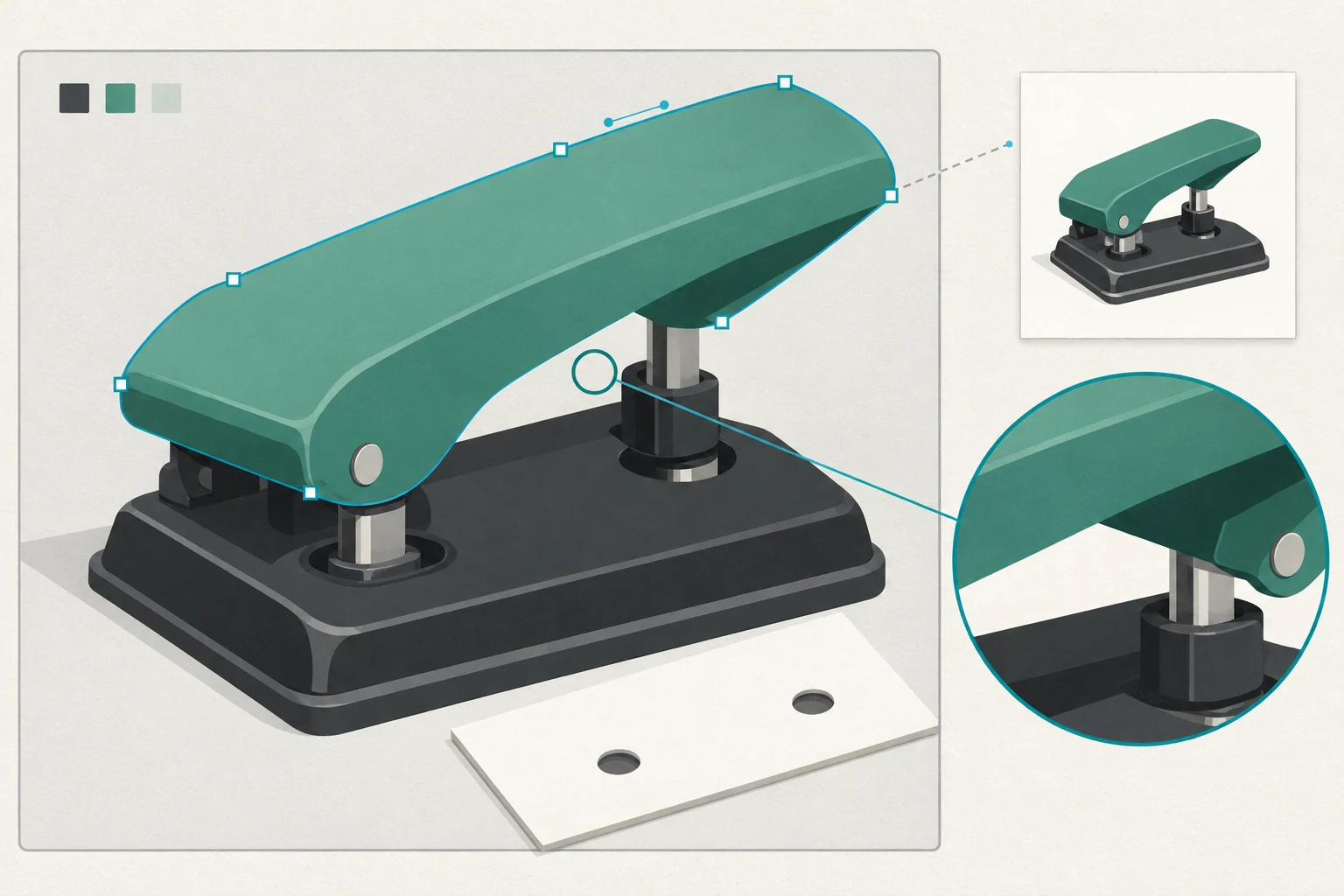
Illustrative example: a workshop needs a desktop hole punch graphic for a catalog card 48 pixels wide and a printed guide where it will be 120 millimeters wide. The raised lever and base must remain recognizable. A separate sheet beside the tool has two round holes.
The practical deliverable is an SVG with an independently recolorable lever, distinguishable small shapes, and a short review record. These are proposed acceptance requirements, not a description of an existing output. Similar tasks include object illustrations for catalogs, guides, and presentations.
Which settings SeaGenera provides
These settings were checked against SeaGenera’s catalog and documentation snapshot dated November 1, 2026. The model is available in Playground and the image API. Output is SVG, with one to six images per request. Aspect ratios are 1:1, 4:3, 3:4, 16:9, 9:16, and auto. Our example needs one square image.
One reference image can be supplied. SeaGenera documents PNG, JPEG, and WebP for these attachments; this input format does not provide for uploading an SVG reference. Prepare a raster representation separately if your source is vector artwork. Image streaming is unavailable for this model: the result arrives complete.
OpenRouter lists strength, rgb_colors, and background_rgb_color for the model. These fields are absent from SeaGenera’s published settings for this catalog entry, so they cannot be relied upon in its documented API. Describe colors in the prompt, then check and correct exact palette values in a vector editor.
Two example prompts for one task
First example prompt: “Flat vector illustration of a desktop hole punch with its lever raised, viewed from the side with a slight turn. Dark gray base and sea green lever. A clearly visible gap separates the lever from the base. A separate white sheet with two round holes sits on the right. Large simple shapes, solid fills, light background. No lettering, shadows, or small decorations.”
Example prompt with a prepared PNG reference: “Use the attached illustration as a reference. Preserve the hole punch’s position, base shape, and sheet placement. Enlarge the gap beneath the raised lever; remove small highlights and decorative lines. Preserve two separate round holes in the sheet. Create a simple SVG illustration for a small catalog card.” A reference provides guidance but does not guarantee unchanged geometry.
The prompts have distinct testable goals: the first establishes the object and main shapes; the second addresses a specific problem at small sizes. If only the lever’s color needs changing, try editing the SVG manually first. Another generation may alter other details and will require a complete review.
Checking whether the SVG is easy to edit
Download the result and open it in a vector editor. Inspect the object list to see what constitutes the drawing. W3C’s specification allows raster images inside SVG, so the file extension alone does not prove that editable paths exist. This check concerns the delivered file; it does not imply that the model necessarily inserts raster content.
Select the lever and temporarily apply a conspicuous test color. Check that the base, sheet, and background retain their colors. If half the scene changes with the lever, determine whether separating a group is sufficient or whether the part must be assembled manually from many fragments.
Record the outcome plainly: the lever can be selected independently; recoloring leaves neighboring parts unchanged; the saved drawing reopens without losses. Node count alone does not determine editability. What matters is how many actions the expected edit requires and whether the shape survives.
Why sharp edges do not guarantee legibility
Inspect the drawing in the actual 48-pixel-wide card at normal viewing scale. Then examine a printed proof 120 millimeters wide. These are illustrative project sizes, not model limits. In the small version, the gap beneath the lever and both holes in the sheet should remain distinguishable.
Illustrative calculation: the drawing area is 480 units wide and the gap is four units. Uniform scaling to 48 pixels makes the gap 0.4 pixels: four multiplied by 48, divided by 480. The outlines may remain vector shapes, yet that gap becomes difficult to distinguish confidently. Scaling cannot supply missing space.
If a detail disappears, enlarge it or remove secondary elements, then inspect again. Test light and dark backgrounds too: a white fill may resemble transparency only on a white page. A separate simplified version is acceptable for small placements; retain the more detailed original.
Cost, limitations, and handoff
SeaGenera’s catalog specifies a per-image rate for this model’s SVG output. Plan spending around the requested variants and separate attempts; supplying a text prompt does not make generation free. Check current rates in the model card and on /pricing. Review the reserve before submitting and the confirmed charge in request history afterward.
SVG does not guarantee meaningful layers, easy part selection, or print readiness. Treating the illustration as an accurate mechanical drawing would be inappropriate. Review every image in a request separately: a shared description does not guarantee matching proportions or styling.
Give the designer the reviewed SVG, original description, selected settings, and a record of the viewing size and recoloring check. Save a direct API result when received. If the file passes object checks and looks correct at a large size but loses its meaning in the small card, prepare a simplified version before publication.


