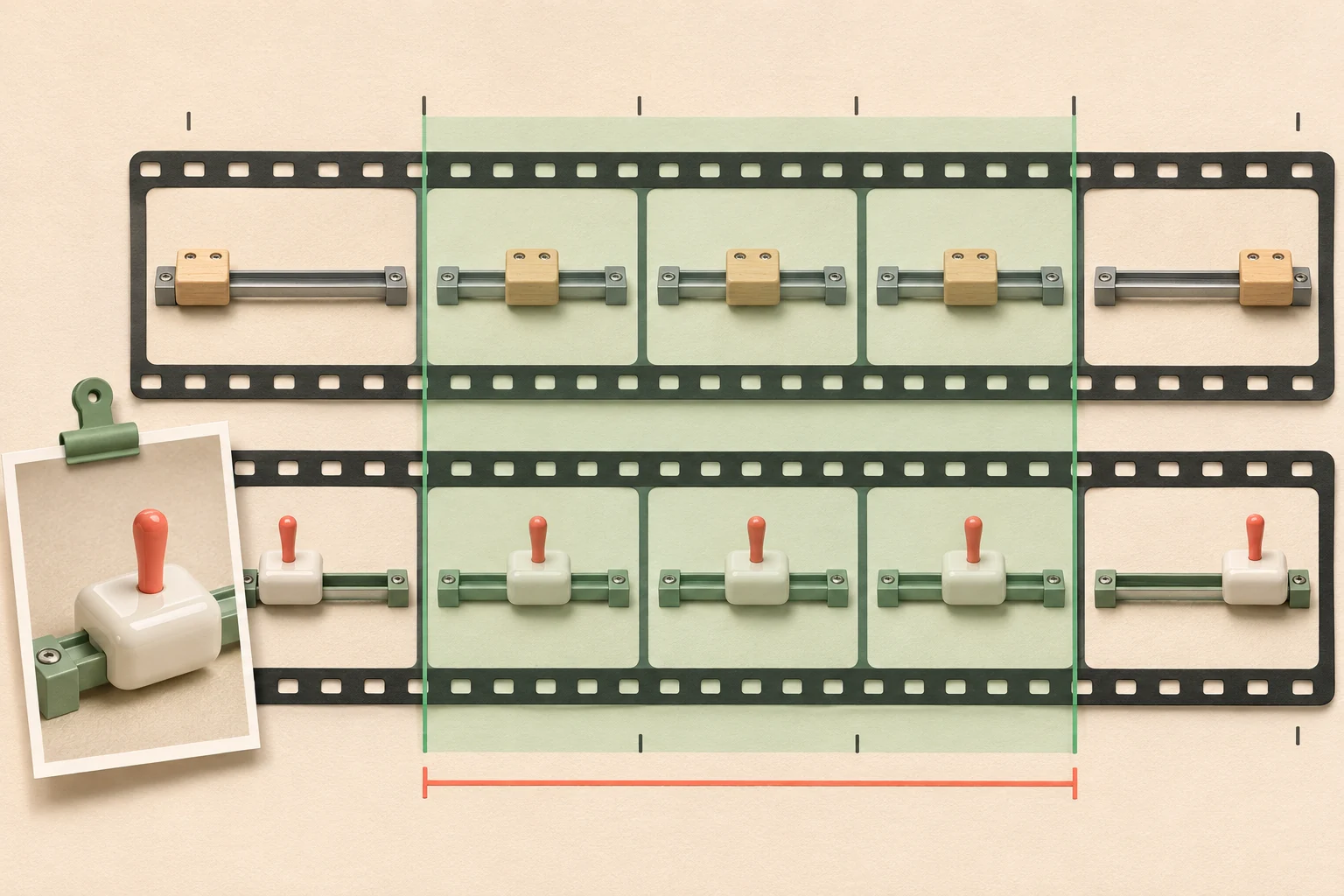
The task: preserve a product clip’s pacing
ByteDance: Seedance 2.0 Mini generates video from text and supports image, video, and audio references. External documentation confirms this exact Mini version: 480p or 720p output, lasting 4–15 seconds. This supports a practical task: use a photograph for an object’s appearance and a video reference for its movement. Timing accuracy requires a separate check.
The fictional example is a short tabletop slider preview. It travels halfway along a rail, pauses to display a detail, then continues. This scenario can help approve an advertising scene or animation concept. A clip intended to demonstrate a mechanism’s actual speed requires footage of the real product. All prompts and calculations below are illustrative; no paid generations were performed for this review.
Prepare a timing map before prompting
Suppose the illustrative reference video lasts six seconds. A wooden slider remains still until the first second, moves right until 2.5 seconds, pauses until 3.5 seconds, then reaches the endpoint by the fifth second. It remains stationary for the final second. This movement pattern is what the new scene should reproduce.
Prepare a separate appearance image: a white ceramic slider with a coral handle on a green rail. Both materials should clearly show the route’s beginning, midpoint, and end. Choose a stationary camera so object displacement is easier to distinguish from camera movement. Remove unrelated actions from the reference that should not appear in the new clip.
Record four checkpoints: movement starts, the pause starts, movement resumes, and final arrival. For this example, allow each checkpoint to differ by no more than 0.2 seconds, with a middle pause lasting 0.8–1.2 seconds. These are chosen editorial criteria, not Mini’s advertised accuracy. Agree on them before reviewing an output.
SeaGenera settings and boundaries
In the supplied SeaGenera snapshot dated November 13, 2026, the model is available in Playground and the API. For this example, choose six seconds, 720p, 16:9, and generate_audio disabled. Mixed references use input_references; the documentation permits images, video, and audio according to the model’s inputs. Playground accepts complex fields through additional parameters. Each particular combination is validated separately.
First and last frames are also provided, through a different control mode. When frames and ordinary references are supplied together, SeaGenera prioritizes frames, so omit them here. Do not plan on 1080p, 4K, or Draft mode for Mini. BytePlus SA documentation also rules out an audio reference without an accompanying image or video.
Continuation using a SeaGenera job ID is undocumented for this card: its parameters lack previous_job_id. The seed field has a Boolean type without an explained repeatability mechanism, so these examples omit it. frequency_penalty in the general capability list is likewise unconfirmed as a video-method setting. A parameter’s presence in the catalog does not explain how to apply it to motion.
Two illustrative prompts
First example prompt: “Create a six-second product video. Use Image 1 for the slider and rail’s appearance. Use Video 1 for movement pacing and the pause halfway along the route. The slider moves left to right. Stationary camera, even lighting, one continuous shot. Preserve the white ceramic and coral handle. No lettering.” Here, Image 1 and Video 1 denote the set’s only image and video.
If review reveals an overly short pause, an example revised prompt is: “Create a six-second video with the slider and rail from Image 1, using the movement character from Video 1. Remain still until 1 second. From 1 to 2.5 seconds, travel halfway; remain completely still from 2.5 to 3.5 seconds; reach the endpoint by 5 seconds. Then remain still. Stationary camera, one shot, no lettering.”
The second version adds testable timing boundaries. Keep other settings and materials identical to make the intended change clear. Assess each version independently: greater detail does not guarantee a closer match, and another attempt may alter other scene details.
Check the pause throughout its duration
Open the finished file in an editor with frame stepping. Record the four observed checkpoints beside their planned times. The pause starts when the slider actually stops moving and ends when movement resumes. One carefully selected stationary frame cannot establish a one-second pause. Review the entire relevant interval.
Illustrative calculation: suppose the stop begins at 2.6 seconds and movement resumes at 3.0 seconds. The pause lasts 0.4 seconds. Its start falls within tolerance, but its duration misses the chosen 0.8-second minimum. That version fails acceptance. These are example numbers, not measured Seedance 2.0 Mini results.
Also compare positions relative to the rail: roughly half the route should be covered before the pause, and the full route after the second movement. Use the fraction of distance traveled so different object sizes do not obstruct comparison. Check background stability and the slider’s shape. Save timing deviations, pause duration, and the decision in the review record. If a movement boundary is indistinct, mark it uncertain and inspect that interval again.
Cost, waiting, and deciding on another attempt
SeaGenera’s catalog lists Mini’s rate in rubles per individual video_token. Its per-second table is an estimate for 16:9, 24 frames per second, without a video reference. This example includes video input, so that estimate cannot be treated as its exact price. The catalog notes that audio uses the same rate; disabling it alone does not promise a discount.
Check current terms in the model card and on /pricing. Video dimensions, duration, and input processing affect the workload. Check the reserve before submission and the confirmed charge after completion. Your production log should account for every attempt, including versions rejected for failing the pause check.
SeaGenera creates video as an asynchronous job. When completion is delayed or uncertain, check the existing job before repeating; redelivery of the same request uses its original operation key. Download the finished file. Exact timing remains an acceptance criterion, not a model guarantee: when frame-level precision is mandatory, plan for editing or filming instead of endless additional attempts.


