A task to consider Flash for
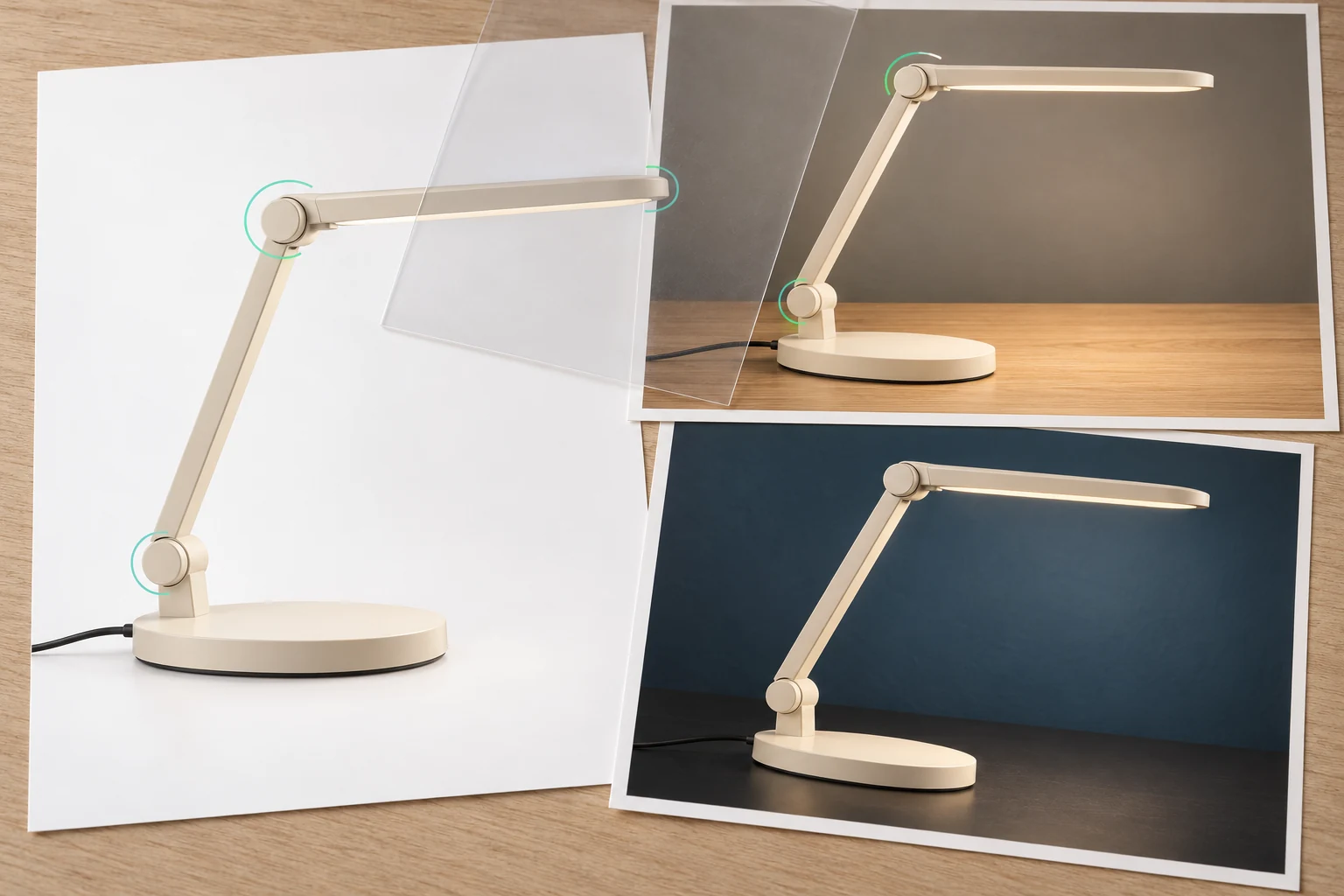
ByteDance Seed: Seedream 5.0 Flash generates and edits images. BytePlus documentation explicitly includes Flash in text-to-image and image-guided workflows. This review proposes a specific task: develop alternative settings for one product, such as a bright desk and a dark interior scene featuring a folding desk lamp.
The practical output is a set of presentation options with the product’s construction checked. These can support design approval or illustration. If an image must accurately depict an item for sale, preserving its details is mandatory. This review uses documentation; the examples are illustrative, and no paid generations were performed. SeaGenera information was checked against the supplied catalog, /docs, and /docs.js snapshots dated October 20, 2026.
Settings available in SeaGenera
The supplied catalog lists 1K and 2K resolutions, one output per request, and aspect ratios including 1:1, 3:2, 9:16, and auto. We will use 3:2. The catalog also marks seed as supported, but the snapshot gives no value range: check the model card or form, without promising exact reproduction.
Reference limits differ: SeaGenera’s catalog and OpenRouter’s card list up to 14, while BytePlus materials list up to 10. This does not establish that the catalog maximum will work. Our example uses one reference; a workflow with many attachments requires clarification of the current limit.
For image requests, use media.parameters. Finding temperature, top_p, or max_tokens in the general supported_parameters list does not establish their applicability here. This model has no streaming preview in SeaGenera. BytePlus describes Flash layer decomposition, but SeaGenera’s published settings do not expose that mode: this workflow does not provide separate layers.
Prepare the original and its defining features
For this illustrative example, take a lamp photograph against a neutral background. It clearly shows an oval base, two circular hinges, a flat head, and a rear cable. Record these features before starting. This short record helps reveal cases where the setting looks convincing but the product has become a different construction.
Initially, restrict changes to the surface and background. Keep the original viewpoint, head position, and product scale to simplify comparison. Start every new setting from the original photograph. Repeatedly transforming edited versions makes it harder to locate where an error appeared. Store the original separately so an intermediate result cannot accidentally replace it.
Two illustrative requests
Example first request with one reference: “Use the attached lamp photograph. Replace the neutral surroundings with a light oak desktop and a quiet warm gray wall. Preserve the oval base, two circular hinges, flat head shape, cable, viewpoint, and lamp position. Add a natural contact shadow. Add no other objects or lettering.” This is an editing instruction, not a description of an actual result.
Example second request using the same original: “Place the lamp from the attached photograph on a dark matte surface against a deep blue wall. Preserve its construction, proportions, body color, viewpoint, and scale. Change only the surroundings and adapt the lighting accordingly. Keep the cable visible.” Retain the first version’s resolution and aspect ratio.
Compare these as two solutions to one task. If correction is needed, identify the specific deviation, such as a missing lower hinge. For the next attempt, attach the original again and restate the desired setting with that correction. A long chain of general requests to “make it more accurate” provides no verifiable direction.
Check whether the product survived the edit
Open the original and candidate side by side, displaying the lamp at comparable sizes. Inspect the base, both hinges, head, and cable exit. Check their connections too: individually convincing parts may connect differently. In this example, attractive lighting cannot compensate for a missing joint or an altered body shape.
With an unchanged viewpoint, a translucent overlay in an ordinary graphics editor can help. Align the bases and compare the arm and head outlines. This reveals proportion changes, but does not establish color or material accuracy. Inspect the contact shadow separately: the lamp should appear to rest convincingly on its new surface.
Review the candidate at publication size and enlarged. The first view checks whether the product reads clearly; the second exposes small defects. Record a concrete decision: the setting works, construction is preserved, or manual editing is needed. Where exact geometry is mandatory, retaining the photographed product in a composite is more dependable than accepting an approximate generated likeness.
Cost and practical limits
SeaGenera’s catalog snapshot specifies a per-image rate, identical for the listed 1K and 2K options. Do not calculate this task from text response length. An illustrative plan comprising three alternatives and one correction involves four separately paid generations. Before submitting, check the current model card, /pricing, and displayed reservation. Reconcile the final amount against the confirmed charge.
Set an attempt limit beforehand and keep the original, request, settings, and selected result together. Download completed files: Playground storage is time-limited, and direct API requests do not add them to My Generations. Flash is an option for developing alternative settings, but documentation does not guarantee preservation of every detail. Decide whether to publish after comparing the result with the original product.


